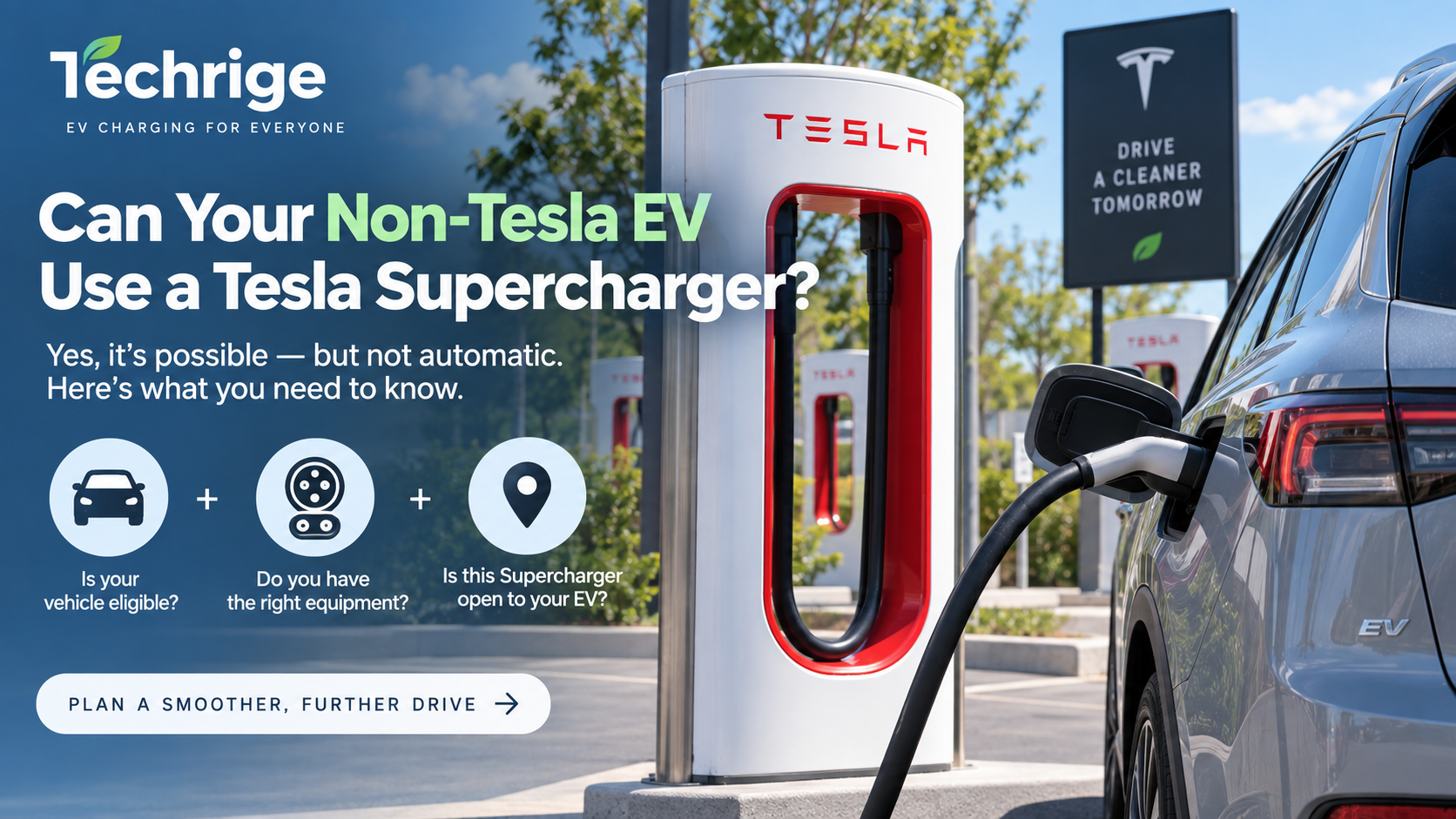
Yes, many non-Tesla EVs can now use selected Tesla Superchargers in the United States and Canada, but access is not automatic.
Whether your EV can charge at a Tesla Supercharger depends on three things:
- Your exact vehicle and model year
- Whether your EV has a native NACS port or needs an approved NACS DC adapter
- Whether the specific Tesla Supercharger location supports your vehicle
Tesla continues to open parts of its North American Supercharger network to other automakers. Some newer non-Tesla EVs have a native North American Charging Standard (NACS) inlet, while many CCS1-equipped EVs can access compatible Superchargers with an approved NACS DC fast-charging adapter.
However, not every Supercharger works with every EV.
Tesla currently separates Supercharger access into different categories, including Tesla-only sites, locations equipped for other EVs through Magic Dock, and NACS Superchargers that are being opened to supported automakers.
Before planning a trip around one, check Tesla’s official Supercharging Other EVs guidance and your vehicle manufacturer’s charging app or documentation.
Can any non-Tesla EV use a Tesla Supercharger?
No.
A Tesla Supercharger should not be treated like a universal public fast charger simply because the connector appears to fit your vehicle.
Your EV needs to be supported by the automaker and charging network, and the individual Supercharger must be available to your vehicle.
A useful way to think about Supercharger compatibility is:
Vehicle compatibility + correct charging equipment + compatible Supercharger = usable charging stop
If any one of those pieces is missing, plan to use another DC fast charger.
The three checks to make before using a Tesla Supercharger
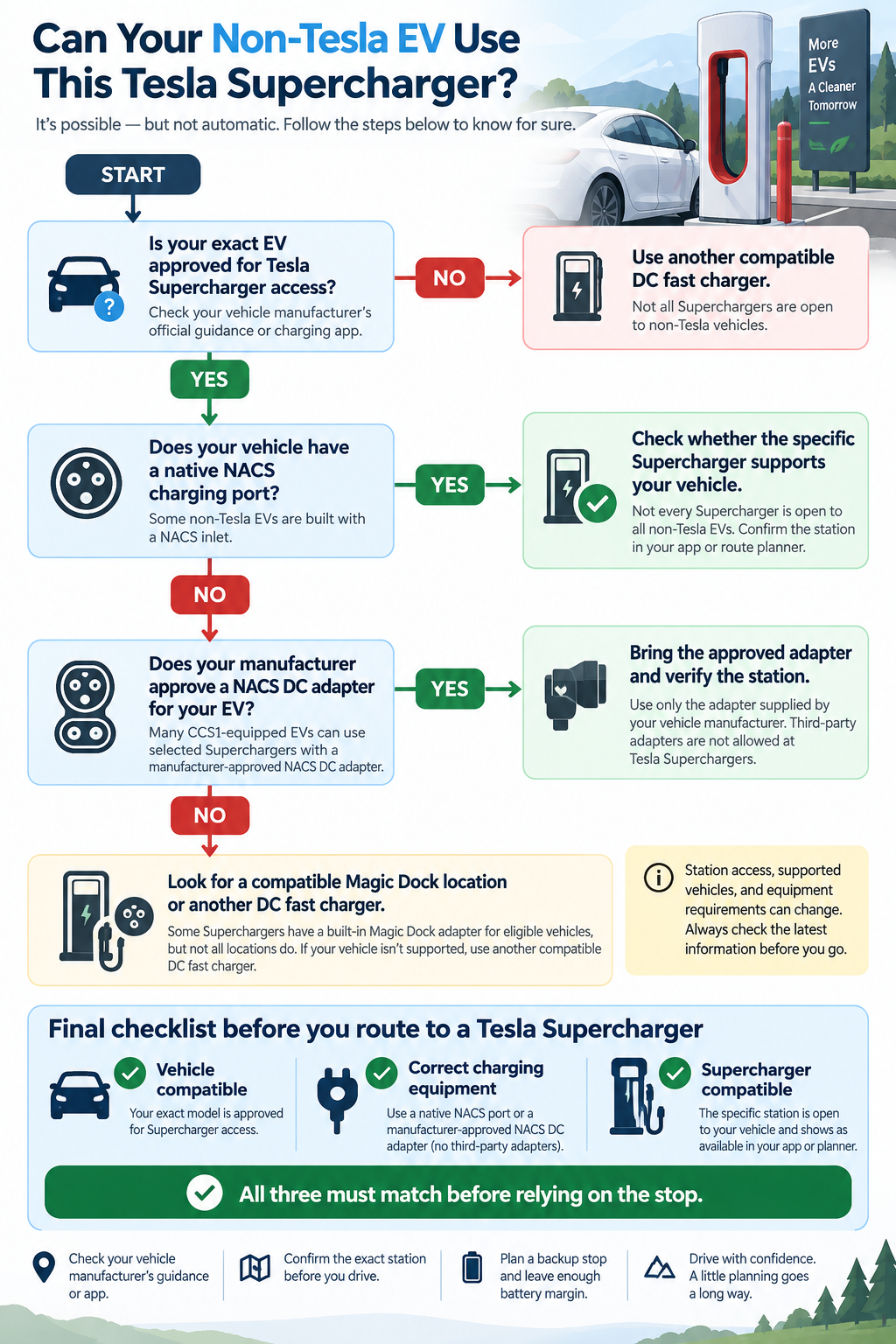
1. Confirm that your EV is supported
Start with your vehicle manufacturer.
Automakers determine which vehicles can access Tesla Superchargers, whether a software update is required, which charging app should be used, and whether an adapter is needed.
For example, Ford directs EV drivers to use its charging tools to locate designated Tesla Superchargers. Ford drivers with compatible CCS1 vehicles may need the Ford NACS Fast Charging Adapter at supported locations.
See Ford’s public EV charging guidance for current information.
General Motors takes a similar approach. Compatible Tesla Superchargers are integrated into GM’s vehicle apps, and some CCS1-equipped GM EVs require a GM-approved NACS DC adapter.
See GM’s public charging information for current guidance.
Do not assume your EV qualifies because another vehicle from the same manufacturer does. Compatibility can depend on the model, model year, charging hardware and software.
2. Determine whether you need an adapter
Next, identify your vehicle’s DC fast-charging inlet.
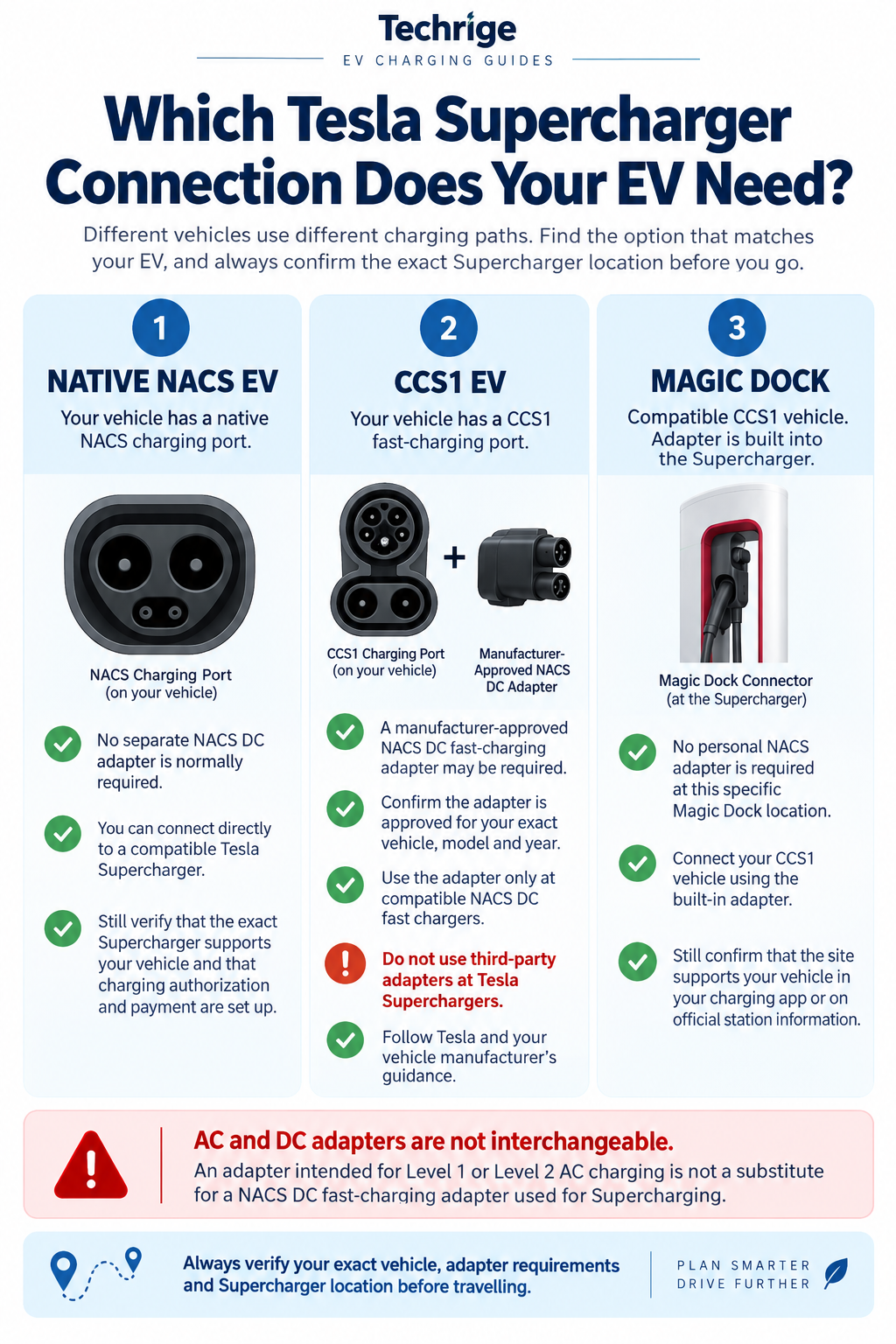
Your EV will generally fall into one of these charging paths:
- Native NACS port: no separate NACS DC adapter may be required.
- CCS1 port: an approved NACS DC fast-charging adapter may be required.
- Magic Dock-compatible charging: the Supercharger itself provides the CCS1 adapter at supported locations.
The exact requirement should come from your vehicle manufacturer or the Tesla app—not from the appearance of the connector alone.
3. Confirm the exact Supercharger location
Even if your EV supports Tesla Supercharging, not every Tesla Supercharger location is open to your vehicle.
Check the exact location using:
- your vehicle manufacturer’s charging app or navigation system;
- the Tesla app; or
- Tesla’s Supercharger map.
Verify the station again shortly before departure. Charging availability, equipment and site access can change.
Native NACS EVs and Tesla Superchargers
Some newer non-Tesla EVs are now being built with a native NACS charging inlet.
A native NACS port removes the need for a separate CCS1-to-NACS DC adapter, but it does not automatically unlock every Tesla Supercharger.
The vehicle still needs to be supported for Supercharger access, and the station itself must be available to that vehicle.
Before travelling, verify:
- that your manufacturer supports Tesla Supercharging;
- that the vehicle software is current;
- that the station appears as compatible in the appropriate app; and
- how payment or session activation works.
A native NACS connector solves the physical connection. It does not replace network authorization.
CCS1 EVs using a NACS DC fast-charging adapter
Many non-Tesla EVs currently on the road use a CCS1 charging inlet.
Some of these vehicles can use compatible Tesla Superchargers with a manufacturer-approved NACS DC fast-charging adapter.
The important word is approved.
Tesla states that compatible CCS1 vehicles should use a NACS DC adapter supplied by Tesla or the vehicle manufacturer. Tesla also prohibits third-party adapters at Superchargers.
Ford gives similar guidance. Its NACS fast-charging adapter is intended for designated Tesla Superchargers and other compatible NACS DC fast chargers.
Ford’s official adapter guide also makes an important distinction: its DC fast-charging adapter is not intended for ordinary Level 1 or Level 2 AC charging.
Never assume an adapter is safe or supported simply because the connectors physically fit.
What is Tesla Magic Dock?
Some Tesla Supercharger locations include a built-in adapter known as Magic Dock.
Magic Dock allows compatible CCS1-equipped EVs to connect without the driver bringing a separate NACS DC adapter.
The adapter remains attached to the Supercharger and is released as part of the charging process.
Magic Dock can make charging easier for non-Tesla drivers, but it does not mean every Tesla Supercharger has one.
You still need to confirm:
- that the station is Magic Dock-equipped;
- that your vehicle can use the location;
- that the charging cable can reach your charge port; and
- how to activate and pay for the session.
Tesla Supercharger types explained
When planning a stop, it helps to think of Tesla Superchargers in three practical categories:
Supercharger typeWhat it means for a non-Tesla driverTesla-only SuperchargerDo not rely on this location for a non-Tesla EV.Supercharger open to other EVs / Magic DockCompatible non-Tesla EVs may be able to charge using the station-provided adapter.NACS Supercharger open to supported automakersA native NACS EV or eligible CCS1 EV with an approved NACS DC adapter may be able to charge.
The physical connector is only part of the process.
Your vehicle, charging hardware, software authorization and station all need to work together.
Can I use a third-party NACS adapter at a Tesla Supercharger?
Do not assume so.
Tesla’s current guidance says that Supercharging is available to compatible NACS-equipped vehicles and CCS1 vehicles using an NACS DC adapter supplied by Tesla or the vehicle manufacturer.
Tesla prohibits third-party adapters at its charging stations.
Your automaker may also have its own requirements regarding supported charging equipment.
For that reason, use the adapter specifically approved for your vehicle.
Avoid:
- aftermarket adapters that are not approved by your automaker;
- stacking multiple adapters together;
- extension cables between the charger and vehicle;
- damaged adapters or connectors; and
- using an AC adapter for DC fast charging.
AC NACS adapters and DC NACS adapters are not the same
This is an easy mistake to make.
The NACS connector format can be used for both AC and DC charging, but the adapters used for those charging types are not interchangeable.
For example, an adapter intended to let a CCS1/J1772 vehicle use a Tesla Destination Charger or another Level 2 AC charger is not automatically suitable for a Tesla Supercharger.
Tesla Supercharging is DC fast charging.
Ford specifically states that its NACS fast-charging adapter is intended for compatible DC fast chargers and is not designed for Level 1 or Level 2 AC charging.
Always verify the charging type printed in the adapter instructions.
How to find Tesla Superchargers that work with your EV
The safest way to locate a compatible station is to use your vehicle manufacturer’s supported charging tools.
You can also use the Tesla app.
For non-Tesla EVs, Tesla allows drivers to add vehicle information so the app can show Superchargers compatible with that vehicle.
Before setting out, confirm:
- the station appears as compatible;
- you have the required adapter, if applicable;
- your payment method or charging account is configured;
- the charger is currently available;
- you have enough battery remaining to reach a backup station if needed.
Do not route to a Supercharger simply because it appears on a generic map.
How to charge a non-Tesla EV at a Tesla Supercharger
The exact process varies by automaker and station, but the general sequence is straightforward.
Before arriving
Confirm the Supercharger in your vehicle manufacturer’s app or Tesla app.
If your EV needs a NACS DC adapter, make sure the approved adapter is in the vehicle.
At the station
Park so the Supercharger cable can reach your charging port without putting unnecessary strain on the cable.
Charge-port locations vary significantly between EVs, and older Supercharger cables may be shorter than cables at newer installations.
Avoid parking diagonally or blocking more charging stalls than necessary.
Connect the charger
If your vehicle requires a separate approved NACS DC adapter:
- follow your vehicle manufacturer’s instructions;
- attach the approved adapter correctly;
- connect the Supercharger cable; and
- start the session through the supported app or Plug & Charge system.
If the station uses Magic Dock, follow the Tesla app instructions for releasing and connecting the built-in adapter.
Confirm the session has started
Before walking away, verify that your vehicle is actually charging.
Check:
- charging status;
- power delivery;
- estimated charge time; and
- any error messages.
What if the Tesla Supercharger will not start?
A failed charging session does not always mean the charger itself is broken.
Possible causes include:
- the station is not compatible with your vehicle;
- the wrong charging stall was selected in the app;
- your account or payment method is not configured;
- the adapter is not fully connected;
- the vehicle needs a software update;
- the charger is temporarily unavailable; or
- the charging session failed to authorize.
A safe troubleshooting sequence is:
- Read any message shown by the vehicle, charger or charging app.
- Confirm that the Supercharger is listed as compatible with your exact EV.
- Recheck the adapter and connector according to the manufacturer’s instructions.
- Try another compatible stall at the same site if one is available.
- Follow the charging network’s support instructions.
- Use your backup DC fast charger if the issue cannot be resolved quickly.
Avoid repeatedly forcing, reconnecting or modifying charging equipment.
Tesla Supercharger compatibility checklist
Before relying on a Tesla Supercharger during a trip, ask:
- Is my exact EV approved for Tesla Supercharger access?
- Is the specific Supercharger open to my vehicle?
- Does my EV have native NACS, or do I need an adapter?
- If I need an adapter, is it approved by my vehicle manufacturer?
- Am I using a DC fast-charging adapter rather than an AC-only adapter?
- Is my charging account and payment method ready?
- Can the cable reach my EV’s charging port?
- Do I have a backup charging stop?
If you can answer all of those questions before departure, the chance of arriving at an unusable charger is much lower.
Frequently asked questions
Can a Ford EV use a Tesla Supercharger?
Compatible Ford EVs can use designated Tesla Superchargers with the charging equipment specified by Ford. CCS1-equipped Ford EVs may require Ford’s NACS Fast Charging Adapter. Confirm the exact station in Ford’s charging tools before travelling.
Can a GM EV use a Tesla Supercharger?
Compatible Chevrolet, GMC and Cadillac EVs can use supported Tesla Superchargers. Depending on the vehicle’s charging inlet, a GM-approved NACS DC adapter may be required. GM recommends using its vehicle app to locate and activate compatible stations.
Do I need the Tesla app to charge a non-Tesla EV?
It depends on the vehicle and charging integration. Some automakers support charging through their own app or Plug & Charge system, while Tesla also allows other-EV drivers to locate and activate compatible Superchargers through the Tesla app.
Follow the process recommended by your vehicle manufacturer.
Can I use any CCS-to-NACS adapter?
No. Use only an adapter that Tesla and your vehicle manufacturer approve for your vehicle and the type of charging you are using.
Does a NACS port mean my EV can use every Tesla Supercharger?
No. A native NACS port provides the physical charging connection, but the vehicle and Supercharger must still be compatible and authorized.
Is Magic Dock available at every Supercharger?
No. Magic Dock is available only at selected locations. Verify the specific site before relying on it.
Bottom line
Many non-Tesla EVs can use Tesla Superchargers, but compatibility must be confirmed for both the vehicle and the individual station.
A native NACS port can simplify the connection. A CCS1 EV may need an approved NACS DC adapter. Some locations provide a Magic Dock adapter directly at the charger.
The safest approach is always the same:
Check your vehicle manufacturer → verify the exact Supercharger → use only approved charging equipment → keep a backup charging option.
That prevents the most common Supercharger mistakes: assuming every Tesla station is open to every EV, assuming every NACS connector works the same way, or using an adapter simply because it physically fits.
Sources
- Tesla — Supercharging Other EVs
- Ford — Public EV Charging
- Ford — What Adapter Do I Need?
- GM — Public Charging