
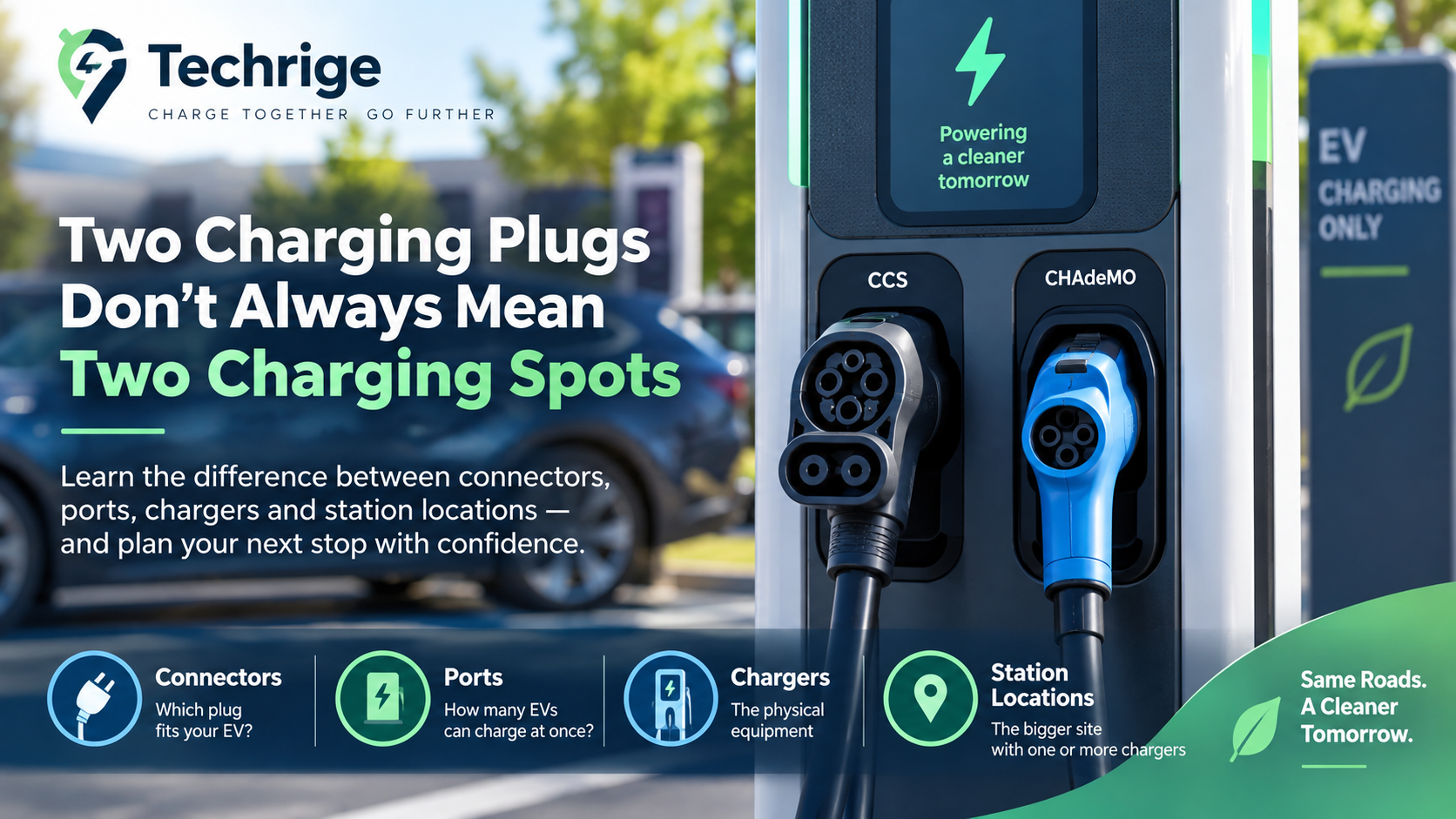
Two EV Charging Plugs Don’t Always Mean Two Available Charging Spots
Two charging plugs on the front of a public charger can look like two available charging opportunities. Often, they are not.
A single piece of public Level 2 or DC fast-charging equipment may offer two connector options so different vehicles can use it. But if those connectors belong to the same charging port, the equipment can deliver power to only one vehicle at a time. If one driver is charging through either connector, the other cable does not automatically represent a second open session.
That distinction helps explain a common frustration: a map or a quick look at the equipment suggests plenty of plugs, yet every usable charging space is occupied.
Before making a charging stop part of your route, it helps to count ports, confirm the connector your vehicle can use, and treat live status as useful planning information rather than a reservation.
The simple rule: count charging ports, not visible cables
The U.S. Department of Energy's Alternative Fuels Data Center defines an EV charging port as equipment that can provide power to one vehicle at a time, even when that port offers multiple connectors.
For drivers, the practical takeaway is simple:
- Connector or plug: tells you how the vehicle connects.
- Charging port: tells you how many vehicles can potentially charge at once.
- Charger or charging post: the physical equipment, which may contain one or more ports.
- Station location: the broader site containing one or more chargers.
A charger with two cables may therefore represent one charging opportunity, not two. The cables may simply be alternate connector choices connected to the same port.
This is especially important at smaller sites. A location may have two charging posts, each with two visible cables, but if each post has only one port, the site may support two simultaneous charging sessions—not four.
The hardware design, the network's listing language, and the site layout can all vary. Do not assume that every cable shown in a photo, app, or map result equals an independently available place to charge.
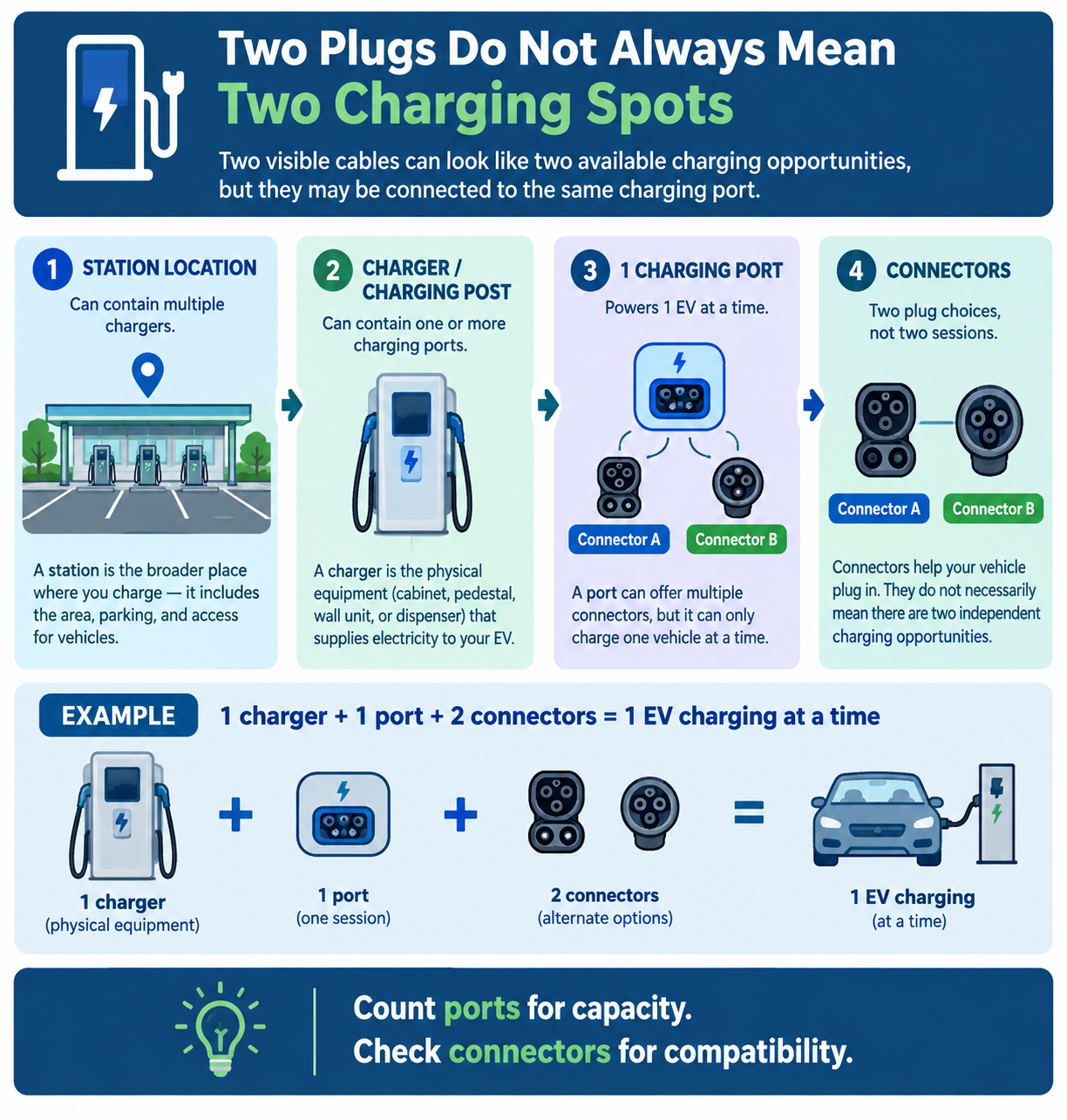
EV charging terms that are easy to mix up
Public charging information uses several related terms. Operators and apps do not always present them in exactly the same way, so understanding the basic terminology can make charging listings much easier to interpret.
Charging station or station location
A charging station can refer to the broader place where drivers charge: the area containing a group of chargers, along with adjacent parking and vehicle-access areas.
Federal terminology distinguishes this broader station area from the individual charging equipment within it in 23 CFR Part 680.
In a driver-facing app, this may be the pin on the map—for example, a shopping centre, parking garage, hotel, or highway service area. A single station location can contain one charger or many.
When a listing says a site has “four chargers,” it is worth opening the location details. The number may describe physical units, ports, connector options, or an operator-specific grouping.
The detail screen and the equipment itself are usually more helpful than the headline count alone.
Charger or charging post
A charger, sometimes called a charging post, is the physical equipment that supplies electricity to the vehicle.
One charger can contain one or more charging ports and may present one or more connectors.
Think of the charger as the cabinet, pedestal, wall unit, or dispenser you park beside. It is visible hardware, but it is not necessarily the best measure of simultaneous charging capacity.
For example, two physical charger cabinets may each support one active session. Even if each cabinet has two attached cables, that site could still have only two vehicles charging at once.
Charging port
A charging port is the key availability unit. It is the system within the charger that provides power to one vehicle at a time.
When planning a stop, port count is generally the number that best answers:
How many EVs might be able to charge here simultaneously?
There can be design differences. Some larger charging equipment may contain more than one port, while some units with multiple visible connector choices have only one.
If the operator lists individual port status, use that information. If the listing is unclear, plan conservatively rather than assuming that every visible cable supports a separate simultaneous session.
Connector
A connector is the plug interface used to connect the charger and the vehicle.
A port may offer more than one connector type, but the Joint Office of Energy and Transportation explains that only one vehicle can charge through a single port at a time.
In everyday terms:
The connector tells you whether you can plug in. The port tells you how many vehicles can charge simultaneously.
Drivers should verify connector and adapter requirements using their vehicle manufacturer's guidance and the charging network's current information.
Do not rely on the presence of a cable alone as proof that it will work with a particular vehicle.
Charging stall or parking space
A charging stall is the parking space intended for a vehicle while it charges.
It is an important on-site clue, but a stall is not automatically the same thing as a charging port.
A site can have:
- More parking stalls than available charging ports.
- One stall associated with each charging port.
- A charger positioned so more than one stall can physically reach it.
- A technically available port that is difficult to use because its intended parking space is blocked.
- Accessibility or trailer-related constraints that reduce the number of practical charging options.
For trip planning, consider both numbers: ports indicate potential simultaneous charging sessions, while usable stalls determine whether you can physically access the equipment.
Why two connectors may still represent one charging opportunity
A charger can provide multiple connector choices without necessarily providing multiple independent charging sessions.
For example:
- A charger has one charging port.
- That port provides two connector options.
- Driver A plugs into Connector A and begins charging.
- Connector B remains physically visible.
- Driver B arrives and sees Connector B.
- Because both connectors belong to the same port, Driver B may need to wait until Driver A's session ends.
The unused connector is not necessarily broken or offline. It may simply be the alternate connector on equipment that is already serving another vehicle.
This is why an app's connector total and a site's practical availability can sometimes appear different.
Connector counts help drivers identify compatible equipment. Port counts are more useful for estimating how many vehicles can charge simultaneously.
A helpful mental model is:
Station → Charger → Port → Connector
Or even more simply:
Ports = capacity
Connectors = compatibility
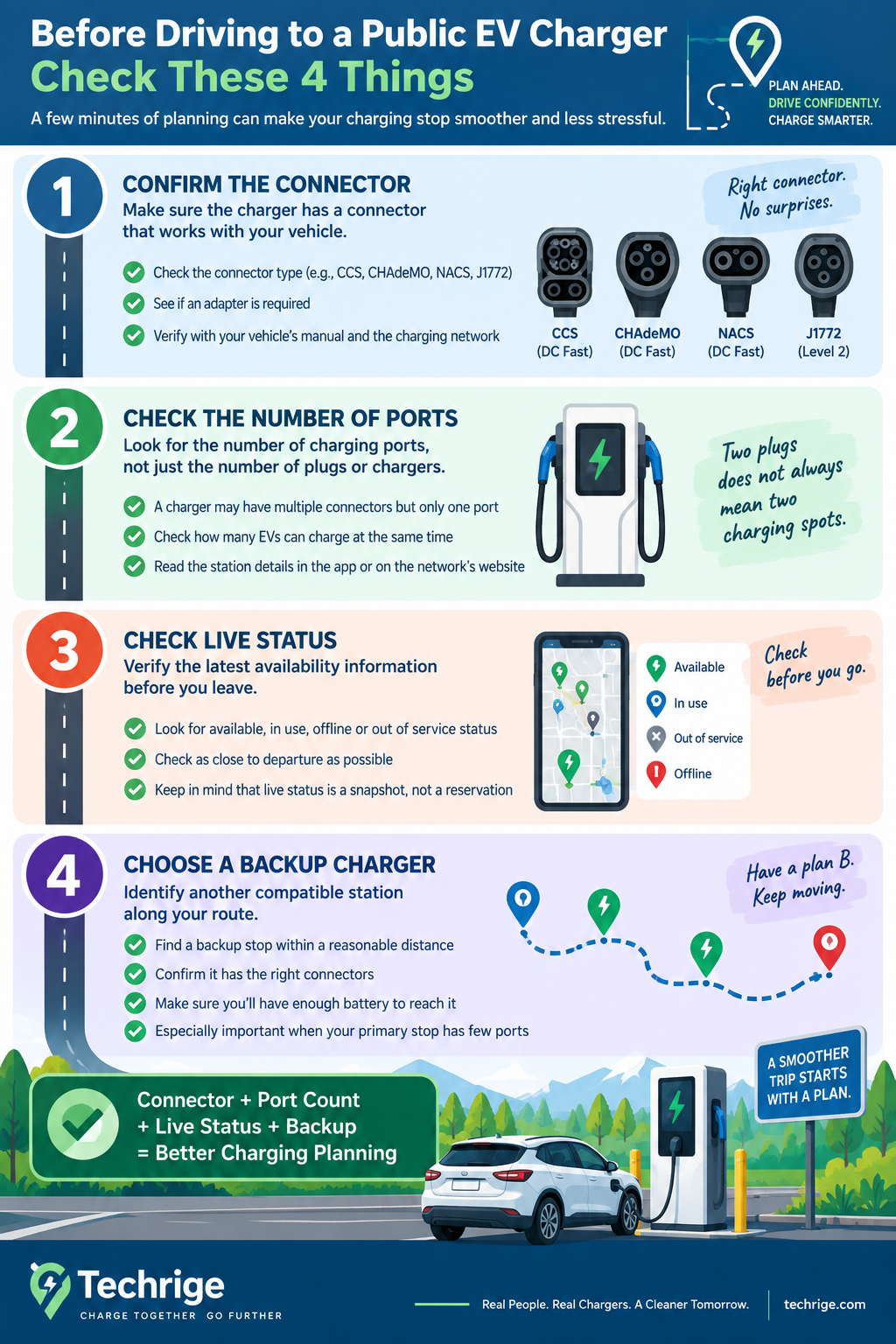
A quick pre-drive check for public charging
No pre-drive check can guarantee an open space, but a few minutes of planning can make a charging stop more predictable.
1. Confirm that the site offers an appropriate connector
Start with your vehicle's charging requirements.
Check the network operator's current listing for the connector options available at that location, then confirm compatibility and any adapter considerations with your vehicle manufacturer and the charging network.
This matters because a site can have several ports but few—or no—ports that work with your vehicle's current equipment.
2. Look for the number of ports, not just plugs or chargers
Open the station details in the charging network's app or website when possible.
Look for wording such as:
- Available ports
- In use
- Out of service
- Offline
- Connector type
- Individual charger or port status
If an operator displays two connectors under one charger without showing separate simultaneous sessions, do not automatically assume both connectors can be used at once.
If a site says it has four connectors but only two charging ports, plan around a maximum of two simultaneous charging sessions.
When a listing is vague, consider the site lower certainty than a location that clearly displays individual port status.
3. Check live status close to departure
For networked stations, charging-network software can help drivers find stations, view real-time status, start charging sessions, and pay for charging where required, according to the Alternative Fuels Data Center.
A status check can reveal whether equipment is reported as:
- Available
- In use
- Offline
- Out of service
- Otherwise unavailable
It can also help you spot a site where all compatible ports are already occupied before you divert from your route.
Check as close to departure as practical, particularly when your planned stop has only one or two suitable ports.
4. Choose a backup stop before you need it
For longer trips or low-battery arrivals, identify another compatible station along your route or near your destination.
A backup can reduce pressure if the first site is busy, blocked, or experiencing an equipment problem.
A backup plan is especially useful when the primary location has:
- Only one or two compatible ports.
- Uncertain live-status information.
- Parking or accessibility constraints.
- Few nearby alternatives.
Consider how far away the backup is, whether it offers the right connectors, and whether you expect to have enough battery remaining to reach it.
Why live status is helpful—but not a guarantee
Live status is a snapshot, not a reservation.
A port shown as available can be occupied before you arrive. A driver may be finishing a session but still be parked in the charging stall. Equipment can also change status after your app refreshes.
There is another practical limitation: not every public charging listing is updated through the same process.
The Alternative Fuels Data Center's charging-network documentation explains that Station Locator information is collected through methods including daily API imports, periodic CSV imports, and manual entry for non-networked stations.
As a result, information may not update with the same frequency for every station or network.
That does not make status information unhelpful. It means the best approach is to use it as one planning input:
- Check live status shortly before leaving.
- Confirm how many compatible ports the site has.
- Allow for another vehicle to arrive before you.
- Keep a backup charging location in mind.
- Recheck the network app if conditions change during the trip.
Operator terminology and app labels also vary. One service may emphasize charger count, another may show connectors, and another may list individual ports.
If the numbers seem confusing, focus on the number of independently usable charging ports rather than relying on a single label.
Arrival checklist: assess the site in under a minute
Once you arrive, use a quick reality check before committing to a stall:
- Confirm that you are at the correct charger or station.
- Identify the connector compatible with your vehicle.
- Check whether the charging port is already serving another EV.
- Look at the charger screen or status lights for faults or warnings.
- Make sure the intended charging stall is physically accessible.
- Confirm that the cable can safely reach your vehicle's charge inlet.
- Avoid assuming that an unused second cable means another session is available.
- If the charger is unavailable, move to your backup rather than waiting until your battery becomes critically low.
Two visible plugs can still mean one available charging opportunity because plugs are connectors, while a charging port represents the system that can power one vehicle at a time.
Once you focus on ports, compatible connectors, live status, and actual stall access, public charging listings become easier to interpret—and your route planning becomes more realistic.
Sources
- U.S. Department of Energy — Alternative Fuels Data Center: Electric Vehicle Charging Stations
- Joint Office of Energy and Transportation — SAE J3400 Charging Connector and Charging Terminology
- U.S. Code of Federal Regulations — 23 CFR Part 680
- U.S. Department of Energy — Alternative Fuels Data Center: Electric Vehicle Charging Networks