
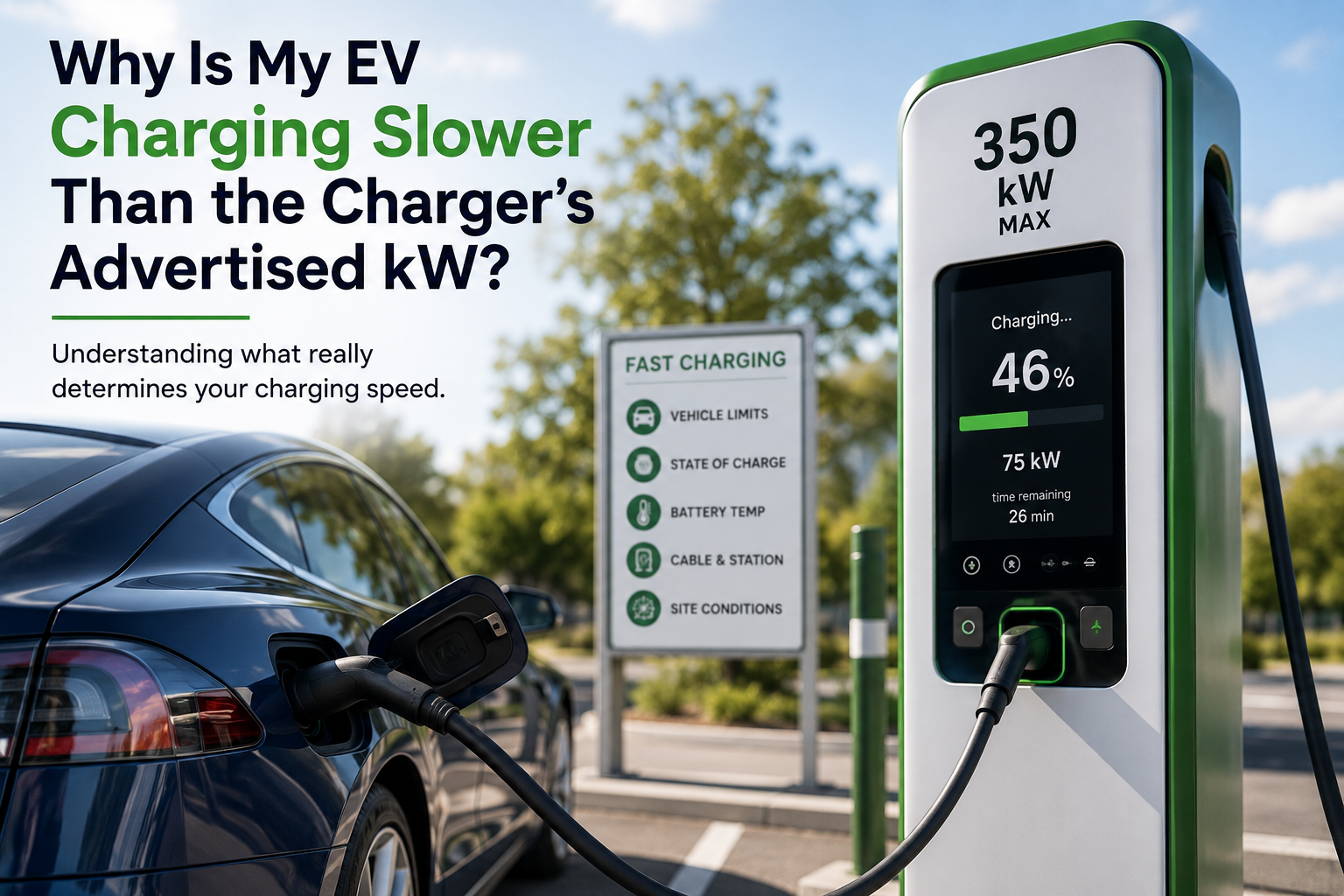
A 150 kW or 350 kW label can set high expectations at a public DC fast charger. But that number describes the charger’s maximum available output under suitable conditions. It does not mean every EV will receive that power—or maintain it throughout the charging session.
Your actual charging rate is determined by several limits working together. The charger has a maximum output, but your vehicle decides how much power to request and accept at each moment.
According to ChargePoint’s explanation of DC fast charging, the vehicle communicates continuously with the charging station and regulates power based on factors including state of charge, available current, battery voltage and temperature. Electrify America similarly explains that the amount of power an EV requests can be affected by battery level, battery temperature and battery health.
That means seeing 75 kW on a 150 kW charger—or 150 kW on a 350 kW charger—does not automatically mean something is wrong.
The better question is:
Does the charging rate make sense for this vehicle, at this state of charge, in these conditions?
The charger rating is a ceiling, not your guaranteed charging rate
Think of the number on the charger as the amount of power the equipment is capable of supplying.
Your EV still determines how much of that power it can accept.
For example, Electrify America states that its Hyper-Fast chargers can provide up to 350 kW, but also notes that not every EV can accept the maximum power available. The charger supplies power according to what the vehicle is capable of handling.
A vehicle capable of accepting a maximum of 100 kW will therefore not suddenly charge at 150 kW simply because it is connected to a 150 kW charger.
Likewise, an EV capable of reaching a much higher peak rate may only reach that number under particular conditions and may maintain it for only part of the charging session.
This is why the same vehicle can show very different charging speeds on different trips—or even at different points during the same charging session.
What actually determines your charging speed?
A useful way to think about DC fast charging is that your actual rate is constrained by the combination of:
- the charger’s available output;
- the vehicle’s DC fast-charging capability;
- the battery’s current state of charge;
- battery temperature;
- the charger cable and electrical limits;
- and, at some sites, the way available power is distributed between chargers.
The lowest relevant limit at that moment can become the practical charging limit.
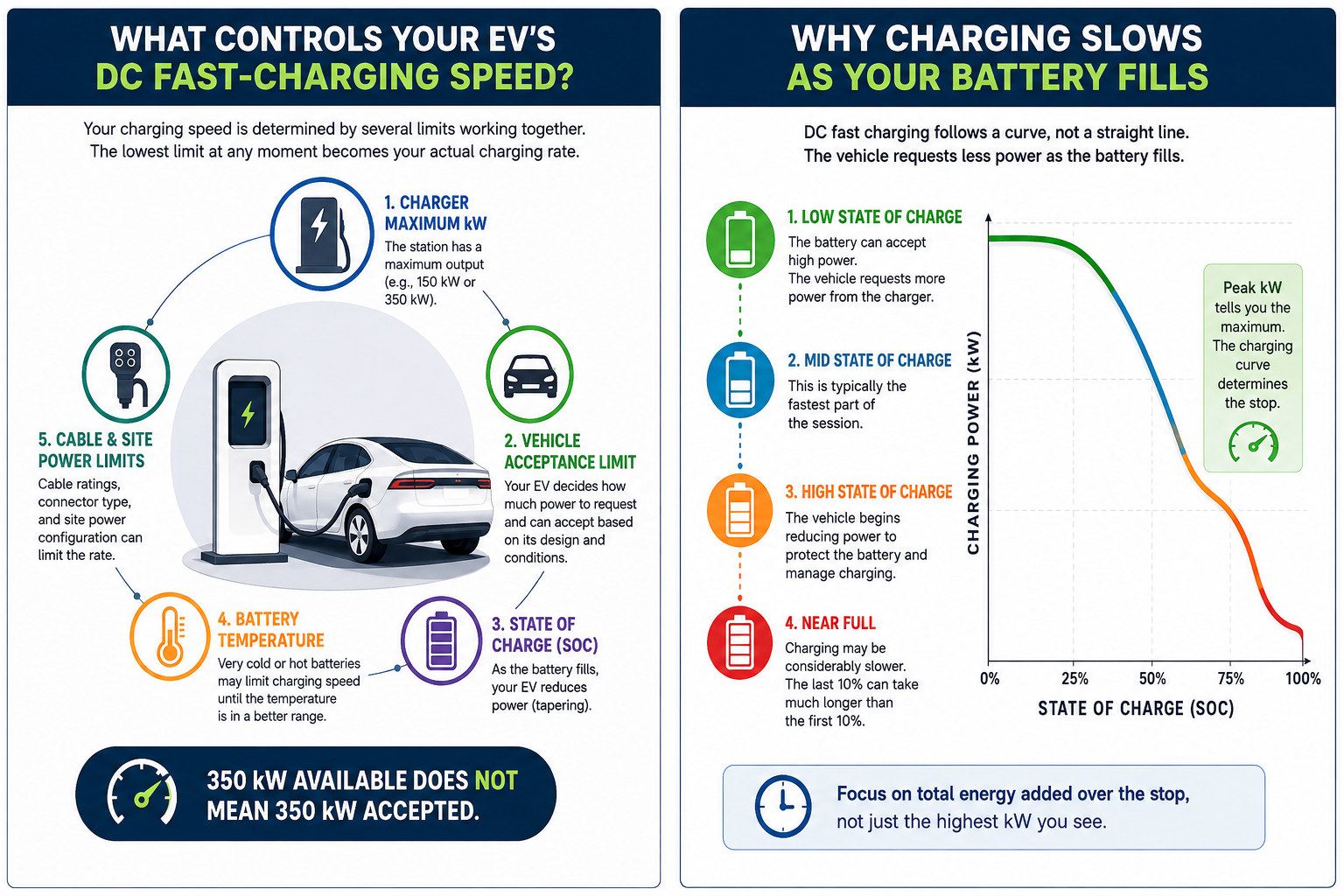
350 kW available does not mean 350 kW accepted
1. Your vehicle has its own DC fast-charging limit
Every EV has charging capabilities determined by its battery pack, electrical architecture and battery-management system.
That limit may be considerably lower than the power available from the charger.
ChargePoint explains that DC fast chargers deliver only as much power as the vehicle can handle and that different EVs have different fast-charging limits.
Before comparing your charging session with the number printed on the charger, check:
- your owner’s manual;
- the manufacturer’s charging documentation;
- your vehicle’s maximum DC charging capability;
- and any conditions attached to the manufacturer's advertised peak charging speed.
Pay particular attention to the word “up to.”
A manufacturer may advertise a peak DC charging rate, but that does not necessarily mean the vehicle will maintain that power throughout the session.
A higher-power charger can still work perfectly well with an EV that accepts less power. The charger simply cannot make the vehicle accept more than the vehicle allows.
2. Your battery may already be relatively full
DC fast charging does not normally remain at one constant power level from empty to full.
Charging power generally changes as the battery fills.
This behaviour is commonly described using a charging curve.
At a lower state of charge, the vehicle may request relatively high power. Later in the session, it can progressively reduce that request. This reduction is commonly called tapering.
ChargePoint’s charging-curve explanation shows how charging can ramp up, reach a higher rate and then slow as the battery fills.
Electrify America also tells drivers that charging speeds may slow toward the end of a session and notes that many vehicles reduce charging speed around the later portion of the battery’s charge range. The exact percentage depends on the vehicle.
Tesla provides a clear manufacturer example. Its Supercharging guidance states that charging speeds slow as the battery charges and that reaching 100% generally takes significantly longer than reaching 80%.
That does not mean 80% is a universal stopping point for every EV.
Your vehicle may use a different charging curve, and your trip may require more energy.
But it does explain why seeing a lower kW number at 80%, 90% or 95% can be completely normal.
Why this matters on a road trip
If your vehicle is already tapering substantially, adding the last portion of the battery can take much longer than adding the same percentage earlier in the session.
When you have reliable charging options ahead, it can therefore be more time-efficient to charge only enough to comfortably reach the next suitable stop rather than automatically waiting for 100%.
That decision should still account for:
- remaining distance;
- weather;
- terrain;
- expected energy consumption;
- charger availability and reliability information;
- and the range buffer you are comfortable keeping.
The goal is not to leave at a particular percentage. It is to leave with enough energy for the trip you are actually making.
3. Battery temperature can affect charging speed
Battery temperature is another important part of the charging equation.
A battery that is very cold or otherwise outside its preferred temperature range may not immediately accept the vehicle’s highest possible charging power.
ChargePoint notes that both battery temperature and ambient conditions can affect charging speed.
Electrify America also explains that extreme temperatures can affect charging performance and that battery preconditioning, where supported by the vehicle, can prepare the battery for faster charging.
Some EVs automatically prepare the battery when you navigate to a compatible DC fast charger.
Tesla provides one example. Its owner documentation explains that navigating to a charging location using Trip Planner can preheat the high-voltage battery so it reaches a more suitable charging temperature before arrival.
Other EVs may operate differently.
If your vehicle offers battery preconditioning, route-based charging preparation or another fast-charging preparation feature, follow the instructions in your owner’s manual.
Do not assume that a procedure recommended for one EV brand applies to every vehicle.
4. The cable and electrical limits matter too
The vehicle and charger are not the only parts of the charging system.
The charging cable also has electrical limits.
ChargePoint specifically notes that factors such as charging cable amperage can affect the rate available during DC fast charging.
Connector compatibility matters as well.
The U.S. Department of Energy’s Alternative Fuels Data Center lists the major connector types used for public DC fast charging in the United States and advises drivers to know which connectors are compatible with their vehicles.
Before relying on a charger, confirm:
- the station has a connector your vehicle can use;
- your vehicle supports DC fast charging through that connection;
- and, when an adapter is required, that the adapter is approved for the vehicle and charging situation.
A physical connection alone does not guarantee that every charger, adapter and vehicle combination will support the charger’s maximum power.
If a connector will not insert or latch normally, appears damaged, or repeatedly produces an error, do not force it or attempt to repair charging equipment yourself.
Use the charging network’s support information shown on the charger or in its app.
5. Some charging stations share available power
The design of the charging site can also matter.
Not every charging dispenser necessarily has an independent power source capable of delivering its labeled maximum to every connected vehicle simultaneously.
A documented example is Electrify America’s Balanced Charging configuration.
According to Electrify America, certain adjacent Balanced chargers share a power cabinet. A Balanced charger can provide up to 150 kW to a capable vehicle and may provide up to 350 kW when the adjacent charger is unused and the vehicle can accept that power.
This does not mean every charging network or every station operates this way.
It does mean that charger layout can occasionally be another piece of the explanation.
Look for information on:
- the charging-station screen;
- charger labels;
- the network app;
- or the network’s support documentation.
Do not assume that moving to another dispenser will automatically increase your speed. But if one charger is behaving unusually or reporting a problem, trying another available dispenser can be a useful troubleshooting step.
Why the last part of an EV charge can take so long
The highest kW number you see during a session is only one point on the charging curve.
For road-trip planning, what matters more is how much energy the vehicle adds during the complete stop.
Imagine a vehicle that reaches a high charging rate early in the session but then progressively tapers.
Its charging session might look something like this:
Low state of charge → power rises → high charging rate → gradual taper → much slower charging near full
Another vehicle may use a flatter charging curve with a lower peak.
Even though the second vehicle never displays the same impressive maximum kW number, the difference in total charging time may be smaller than the peak numbers suggest.
That is why comparing EVs—or charging sessions—based only on peak charging power can be misleading.
For trip planning, consider the complete charging curve and expected charging time rather than focusing only on the biggest number advertised by the vehicle or charger.
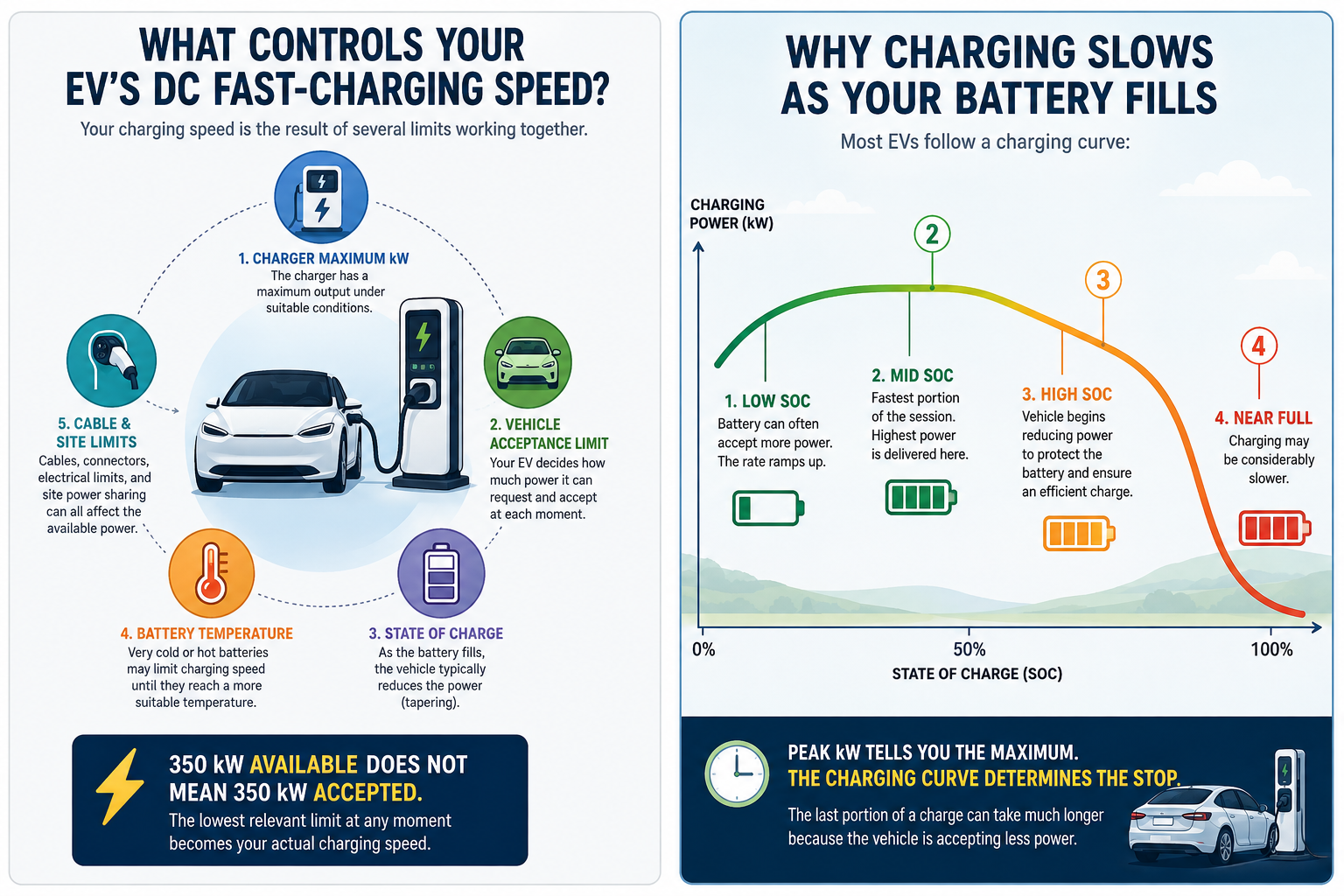
Peak kW tells you the maximum. The charging curve determines the stop.
A practical check when your charging speed seems low
Before concluding that a charger is malfunctioning, check a few things.
Check your state of charge
If your battery is already relatively full, tapering may explain the lower rate.
Compare the result with your vehicle manufacturer’s charging guidance rather than the charger’s maximum number alone.
Check your vehicle’s maximum DC charging capability
A 350 kW charger does not provide an advantage if the vehicle can only request substantially less power.
Your owner’s manual or manufacturer documentation should be the primary reference.
Consider battery temperature
Cold or unusually hot conditions may affect the vehicle’s requested power.
If your vehicle supports battery preconditioning for fast charging, use it according to the manufacturer's instructions.
Give the session a moment to stabilize
Charging power does not necessarily jump immediately to its highest level.
ChargePoint explains that the battery may warm during the beginning of a session and the vehicle can subsequently request more power.
Watch whether the charging rate is increasing, stable or continuing to decline rather than judging the session only from the first number shown.
Check for charger messages
Look at the station screen and network app for:
- equipment errors;
- reduced-power notices;
- unavailable hardware;
- power-sharing information;
- or other station-specific messages.
Check whether another vehicle is using paired equipment
If the charger specifically indicates that it uses shared or balanced power, another active session may affect the available output.
Do not assume this applies unless the charger or network documentation indicates that it does.
Try another dispenser when appropriate
If the charger is reporting an error or delivering an unusually low rate compared with what your vehicle normally receives under similar conditions, another available dispenser may help determine whether the issue is associated with that charger.
Should you wait, move or keep charging?
The right response depends on what your vehicle is doing and how much energy you need.
Keep charging when the rate makes sense
If the battery is at a relatively high state of charge and the charging rate is gradually tapering, the charger may be operating normally.
Continue if you need the additional range.
Wait briefly if conditions are changing
If you arrived with a cold battery or the charging rate is still increasing, giving the session a little time may show whether the vehicle is adjusting its power request.
There is no guarantee that the speed will increase.
Leave once you have the range you need
If charging has slowed considerably because your battery is relatively full and you have a reliable charging option ahead, continuing toward 100% may add unnecessary time to the stop.
Leave only when you have an appropriate range buffer for your route and conditions.
Try another charger when the behaviour looks abnormal
Consider another available dispenser when:
- the charger displays an error;
- the session repeatedly stops;
- the network identifies the charger as having a problem;
- or the charging rate is unusually low compared with your vehicle’s normal behaviour under similar conditions.
Contact the charging network when there appears to be an equipment problem
Use the network’s support channel when:
- charging repeatedly fails to start;
- the connector appears damaged;
- the charger reports a fault;
- the session stops unexpectedly multiple times;
- billing or session information appears incorrect;
- or multiple reasonable troubleshooting attempts produce the same unexplained result.
When contacting support, it can help to have:
- the station location;
- charger or dispenser number;
- approximate time of the session;
- starting state of charge;
- charging power shown;
- and any error message displayed.
For questions involving your vehicle’s charging system, warning messages or expected charging performance, consult the manufacturer or an authorized service provider.
What is usually normal?
A lower charging rate does not automatically indicate a fault.
Behaviour that can be normal includes:
- charging below the charger’s advertised maximum;
- power changing throughout the session;
- lower charging power at a high state of charge;
- slower charging with a cold battery;
- charging power increasing after the session begins;
- and different charging speeds on different trips.
What deserves a closer look?
Consider investigating further when:
- the charger reports an equipment fault;
- the connector or cable appears physically damaged;
- charging repeatedly fails to start;
- the charging session repeatedly disconnects;
- multiple chargers produce unexpected errors;
- or charging performance is dramatically different from what your vehicle normally achieves under comparable conditions.
One unusually slow session is not enough by itself to identify the cause.
The bottom line
A charger marked 150 kW or 350 kW is advertising its maximum available capability—not promising that your EV will charge at that rate throughout the session.
Your actual charging speed is a live negotiation between the vehicle and charging equipment.
The vehicle’s maximum DC charging capability, battery state of charge, battery temperature, charger and cable limits, and sometimes the station’s power configuration can all influence the number you see on the screen.
Start by checking what your vehicle is capable of accepting.
Then consider your battery percentage and temperature.
Finally, look at the charger and network information for equipment errors or site-specific limits.
Understanding that difference makes it much easier to tell the difference between normal charging behaviour and a session that may actually need troubleshooting.
Sources
- ChargePoint — How DC fast charging really works and an intro to charging curves
- Electrify America — What to Expect: Charger Power and Balanced Charging
- Electrify America — Getting Started With DC Fast Charging and Battery Preconditioning
- Tesla — Supercharging Support
- Tesla Owner’s Manual — Cold Weather Best Practices and Battery Preconditioning
- U.S. Department of Energy Alternative Fuels Data Center — Electric Vehicles for Consumers and Charging Connectors