
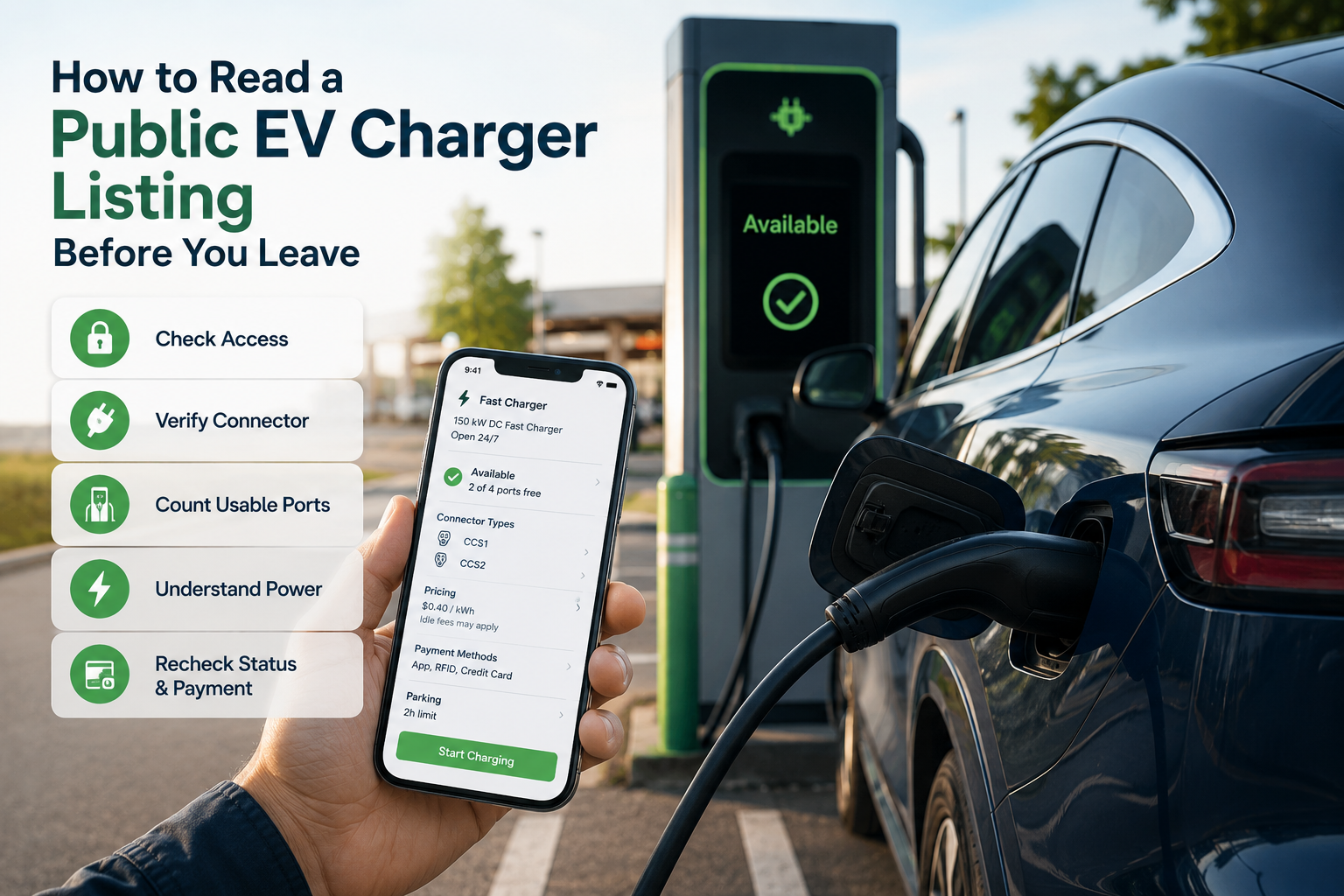
A public EV charger listing is a useful planning tool, but it is not necessarily a reservation or a guarantee that you will be able to charge when you arrive.
A map or charging app may show the station’s location, connector types, reported charging power and, in some cases, live availability. However, a promising pin on a map does not answer every practical question:
- Can you enter the property?
- Is the charger available to the public?
- Does the connector work with your vehicle?
- Is a compatible charging port actually available?
- Can you start and pay for the session?
- Is there another charger nearby if something goes wrong?
Checking these details before leaving can help you decide whether a station is a convenient charging stop, a reasonable backup or too uncertain for the amount of battery charge you have remaining.
Why a Map Pin Does Not Tell the Whole Story
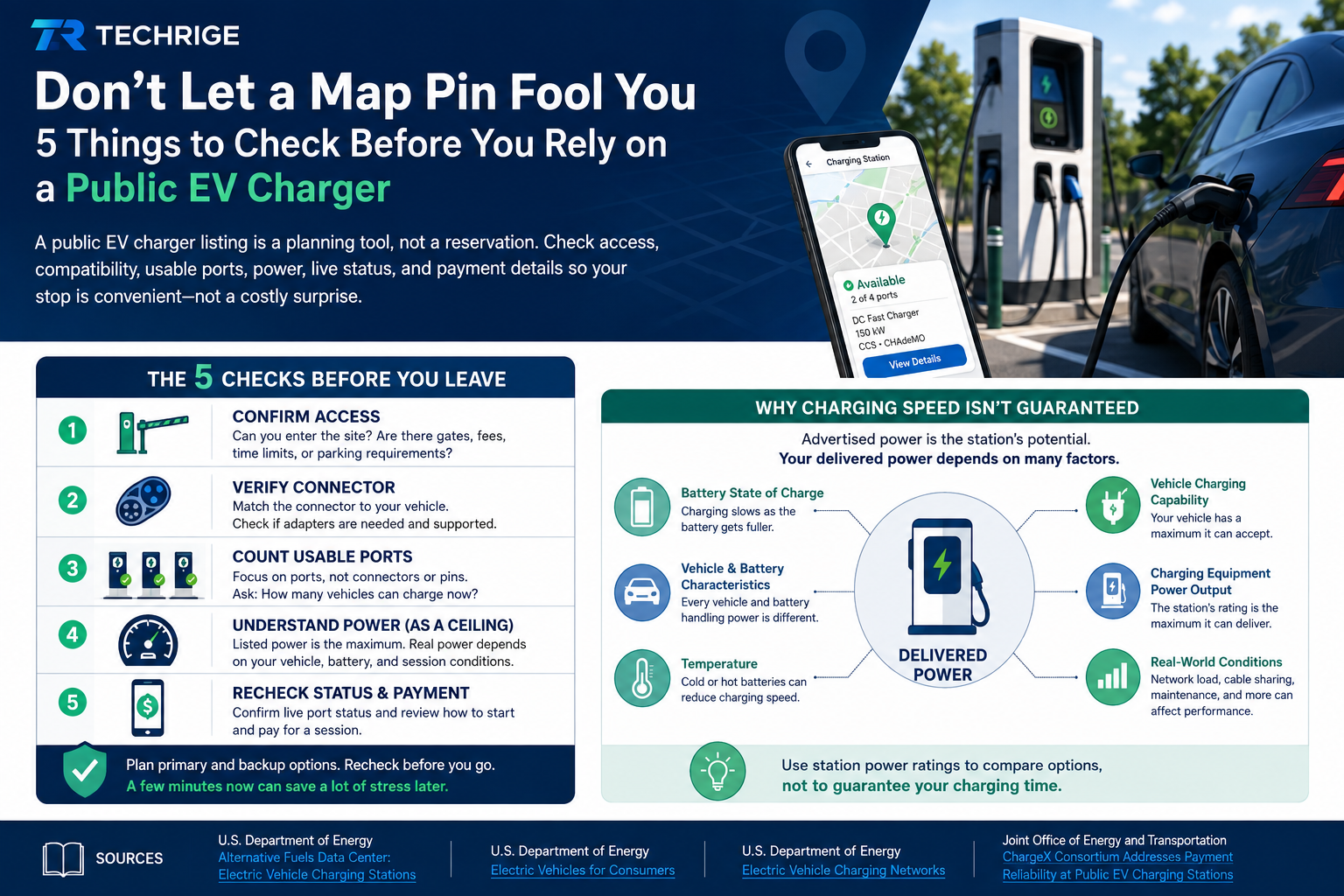
This reinforces the five checks and explains why advertised charging power is not guaranteed.
One of the most common sources of confusion is that a charging location, port and connector are not the same thing.
According to the U.S. Department of Energy’s Alternative Fuels Data Center:
- A charging location is the overall site, such as a shopping centre, hotel, parking garage, workplace or roadside stop.
- A charging port supplies power to one vehicle at a time.
- A connector is the physical plug that connects the charger to the vehicle.
One charging location may contain several charging units and ports. A single port may also have more than one connector attached to it while still being able to charge only one vehicle at a time.
This matters when a listing says that a location has “four connectors.” That does not necessarily mean four vehicles can charge simultaneously. The listing may be counting plug types or connector ends rather than the number of usable charging ports.
When reviewing a listing, read the information in this order:
- Location: Where is the charger, and can you access the site?
- Ports: How many vehicles can charge at the same time?
- Connectors: Is there a connector compatible with your vehicle?
- Power: Is the charger appropriate for the length of your stop?
- Status: Is the equipment currently reported as available?
- Payment: How do you start and pay for the charging session?
The map pin should be the beginning of your research—not the end.
Five Checks to Make Before Leaving
1. Confirm Access, Not Just the Address
A charger may appear public on a map while still having access restrictions.
Before relying on a location, review the station listing, charging-network app, property information and recent driver comments where available.
Check for:
- Public access hours
- Gates or underground parking entrances
- Hotel guest or customer-only restrictions
- Workplace or dealership access rules
- Parking fees
- Maximum parking or charging times
- Overnight closures
- Building access requirements
- Special entry instructions
A charger may technically be available to the public but only during certain hours. It may also be inside a paid parking facility or located on private property where visitors need permission.
For Canadian drivers, Natural Resources Canada provides general EV charging information, while the U.S. Department of Energy’s Alternative Fueling Station Locator includes charging-station information for both the United States and Canada.
Calling the location can be helpful when the charger is at a hotel, workplace, dealership or private parking facility.
Ask a direct question:
Can a visitor or non-guest use the charger at my expected arrival time, and are there any parking or entry instructions?
When access is unclear, treat the location as uncertain and keep enough battery charge to reach another station.
2. Verify Connector Compatibility
Do not rely only on a network logo, photograph or general description such as “fast charger.”
Open the charger’s equipment details and compare the listed connector with your vehicle manufacturer’s current guidance.
Before leaving, confirm:
- Your vehicle’s charging inlet
- The connector types supported by your vehicle
- Whether your vehicle supports AC charging, DC fast charging or both
- Your vehicle’s maximum AC and DC charging rates
- Whether an adapter is required
- Whether the adapter is approved for your vehicle
- Whether the charging operator allows that adapter
A location may list several connector types, but the compatible connector could be attached to a port that is occupied, offline or out of service.
Adapters require additional care. The Joint Office of Energy and Transportation explains that adapters can improve compatibility between different charging standards, but their safety depends on proper design, certification and use. Drivers should review the vehicle manufacturer’s instructions, the adapter manufacturer’s instructions and the charging operator’s current rules.
More information is available in the Joint Office’s guidance on EV charging adapter safety and reliability.
When connector information is unclear, choose a better-documented location or keep enough battery charge to reach another station.
3. Count Usable Ports, Not Connectors or Pins
A station may appear large on a map while still having limited practical capacity.
Look for:
- The total number of charging ports
- The number of ports compatible with your vehicle
- The reported status of each port
- Whether several connectors belong to the same port
- Whether charging units share power
- Any ports reported as unavailable or out of service
Ask yourself:
If I arrive now, how many compatible vehicles could realistically begin charging?
The answer may be lower than the number of connectors displayed in the listing.
For a routine local charge, one compatible port may be enough. For a trip-critical stop, a station with several compatible ports is usually a more resilient choice than a location with only one port.
Having several ports improves your chances, but it still does not guarantee that one will be free when you arrive.
4. Treat Advertised Power as a Maximum
A charging-station listing may show its power in kilowatts. This number is useful for comparing stations, but it does not guarantee that your vehicle will receive that power throughout the session.
The Alternative Fuels Data Center’s charging-station guidance explains that charging time can vary based on factors such as:
- Battery state of charge
- Battery capacity
- Battery temperature
- Vehicle charging capability
- Charging-equipment output
- Charging level
- Vehicle and battery characteristics
- Conditions during the charging session
Your vehicle and the charger determine how much power can safely be delivered. Charging speed may also decrease as the battery becomes fuller.
Use the listed power conservatively:
- Compare the station’s rating with your vehicle’s maximum charging rate.
- Think about how much energy you need, not only how many minutes you expect to stop.
- Allow time for parking, session startup and possible queues.
- Avoid planning an important appointment around the charger’s maximum advertised rate.
- Consider whether a slower Level 2 charger is sufficient when the vehicle will remain parked for several hours.
The best charger is not always the one displaying the largest number.
A more useful question is:
Which accessible and compatible charger gives me a reasonable chance of adding the energy I need within the time available?
5. Recheck Live Status and Payment
Many charging networks allow drivers to locate stations, view reported status, start sessions and pay through an app or website.
The U.S. Department of Energy describes these features in its guide to Electric Vehicle Charging Networks.
Shortly before leaving, check whether the intended port is shown as:
- Available
- In use
- Reserved
- Unavailable
- Out of service
- Unknown
Then confirm how the session must be started and paid for.
Depending on the network and location, you may need:
- The charging operator’s app
- A network account
- An RFID card or key fob
- A contactless bank card
- A QR-code or web payment
- A separate parking payment
- Plug-and-charge support configured in your vehicle
Do not assume that the payment method you used at another charging network will work at this location.
Live status is valuable, but it can change while you are travelling. A charger may also appear online while experiencing a hardware, network, payment or session-start problem.
The Joint Office’s ChargeX payment-reliability work identifies several possible causes of payment problems, including network communication, system integration, equipment hardware, maintenance and customer-experience issues.
Treat live availability as helpful information—not as a promise.
Why Advertised and Delivered Charging Power Differ
It helps to separate two questions:
- What is the station capable of delivering?
- What can your vehicle accept during this particular session?
The charger listing normally answers the first question.
Your vehicle, battery temperature, state of charge, charger configuration and session conditions influence the second.
A higher-powered station may be useful when your vehicle can take advantage of it, but it may not reduce your charging time by as much as expected.
A lower-powered destination charger may be entirely suitable when the vehicle will remain parked during a meal, workday, hotel stay or longer activity.
Instead of asking which charger has the highest advertised power, ask:
Which accessible, compatible and operational charger can reasonably provide the energy I need during the time I have available?
This is more reliable than treating a charger’s maximum power rating as a personal charging-time guarantee.
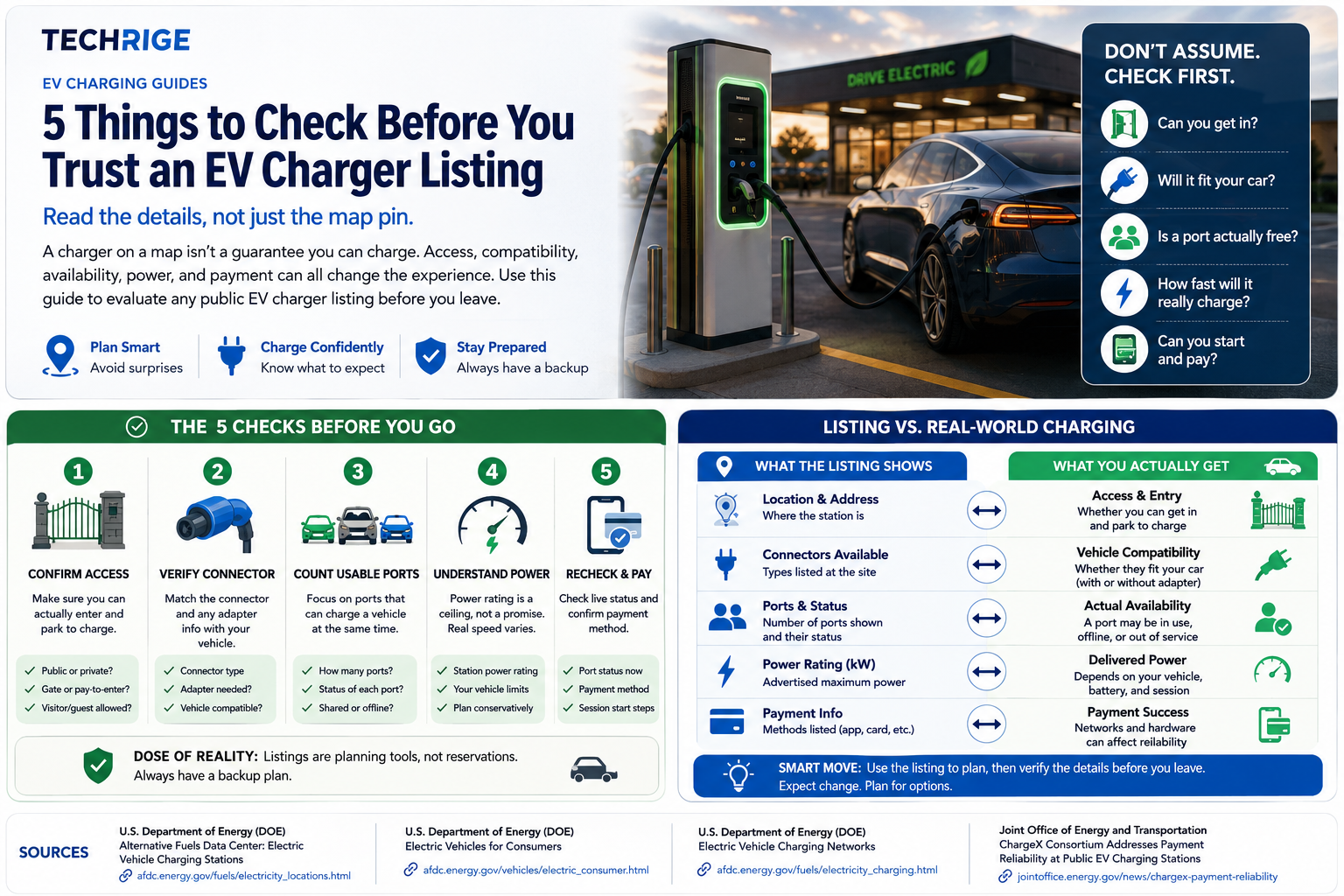
This works well near the end because it summarizes the full planning process: find, check, choose a backup, reconfirm and charge.
Build a Simple Backup Plan
A backup plan is not pessimistic. It is a normal part of EV trip planning because access, availability, charging speed, equipment condition and payment systems can change.
Choose a primary station that passes the five checks. Then identify at least one alternative that:
- Has a connector compatible with your vehicle
- Is reachable with a reasonable battery buffer
- Has clear access information
- Supports a payment method you can use
- Is located at a different site
Another port at the same one-port location is not a meaningful backup. A separate charging station provides better protection against a closed property, blocked parking area or equipment failure.
Keep your backup plan simple:
- Save the primary station in your navigation app.
- Save at least one alternative station.
- Know the distance between the two locations.
- Check both stations shortly before departure.
- Keep the operator’s customer-support information available.
- Leave enough battery charge to reach the backup safely.
- Avoid arriving at the primary station with almost no remaining range.
Charging information may also be updated differently across platforms.
The Department of Energy explains that its Station Locator receives information through methods including network APIs, periodic data imports and manual verification. This makes charging maps valuable for planning, but it also reinforces the importance of checking the charging operator’s current information before relying on an essential stop.
Public EV Charging Checklist
Before leaving, confirm:
- The property is accessible at my expected arrival time.
- Visitors or members of the public are permitted to charge.
- At least one connector is compatible with my vehicle.
- Any required adapter is approved and supported.
- The number of usable ports is clear.
- The charging power is suitable for the length of my stop.
- I understand that advertised power is not guaranteed.
- The port is currently reported as operational.
- I know how to start and pay for the session.
- I have checked for separate parking fees.
- I have saved a compatible backup station.
- I have enough battery charge to reach the backup.
For routine local charging, these checks may take only a minute. For a longer journey or when the battery is low, they can prevent a small listing detail from becoming a major delay.
Read the location, port and connector information separately. Plan around the energy you need rather than an assumed charging speed. Treat live status as useful but changeable, and always keep a realistic alternative within reach.
A good charger listing helps drivers make better decisions. Clear access information, accurate equipment details and dependable status data can help turn a map pin into a charging stop that drivers can use with greater confidence.
Sources
- Natural Resources Canada — Electric Vehicle Charging
- U.S. Department of Energy — Electric Vehicle Charging Stations
- U.S. Department of Energy — Alternative Fueling Station Locator
- U.S. Department of Energy — Electric Vehicle Charging Networks
- U.S. Department of Energy — Charging Electric Vehicles in Public
- Joint Office of Energy and Transportation — Payment Reliability at Public EV Charging Stations
- Joint Office of Energy and Transportation — EV Charging Adapter Safety and Reliability