
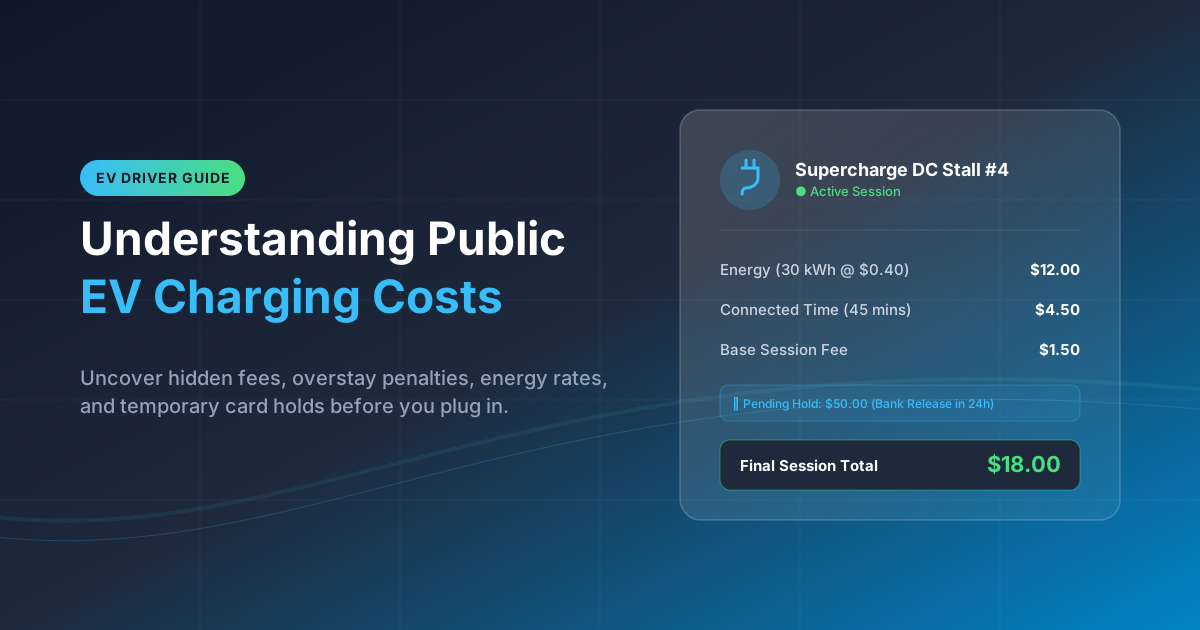
A public charging price is not always a single cents-per-kWh number. Depending on the station, the total may combine electricity delivered, time connected, a session charge, taxes and fees, or a charge for remaining plugged in after charging is complete.
The practical rule is simple: review the price details for the specific charger immediately before you start, then save the session record when you finish. This matters because pricing can vary within one network and may change over time.
Why the number shown for a charging stop may not be the final total
A headline rate can be useful, but it may not tell the whole story. For example, a station might display an energy price while also applying a connection-time charge or a fee once the vehicle is finished charging. The price visible during a session may also be an estimate rather than the final posted transaction.
On ChargePoint-managed stations, the site owner or roaming partner can set the pricing, and the station-specific details can be displayed before the session begins. ChargePoint’s pricing guidance also identifies several possible price components, rather than one universal formula.
Treat the pre-session screen as the decision point. Read the full rate description, not just the largest number. If an item is unclear, consider choosing another charger or confirming the terms through the network’s support channel before starting.
A few reasons the final total can differ from your quick mental estimate include:
- Variable Time-of-Use (TOU) Rates: Energy pricing may adjust automatically based on peak grid demand hours.
- Tiered Charging Speeds: Rates may shift dynamically as your vehicle's battery management system (BMS) slows down the charge intake above 80% state of charge (SoC).
- Parking vs. Charging Fees: Connection time charges continue to accumulate even after active power delivery has dropped or stopped.
- Taxes and Local Utility Surcharges: Regional taxes or municipal franchise fees may be added as separate line items on the final invoice.
The key distinction is between the price terms, the evolving in-session estimate, the final session total, and the temporary pending amount your card issuer may show. They are related, but they are not necessarily the same figure.
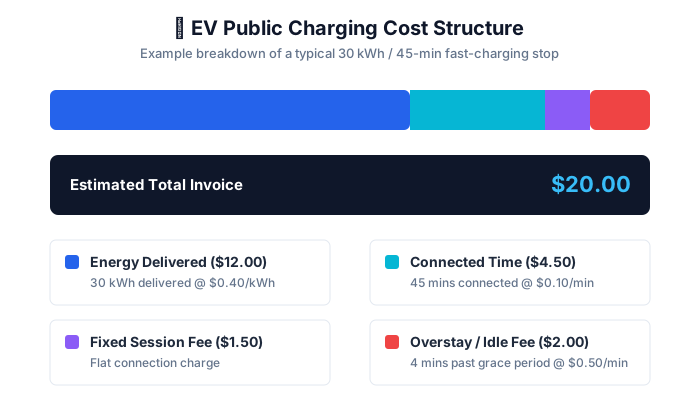
The main price components: energy, connection time, session, minimum, and overstay fees
Network terminology varies, so focus on what the station says it charges and when each charge begins or ends.
Energy rate
An energy rate charges for electricity delivered, commonly expressed per kWh. If the displayed rate is $0.40 per kWh and the session delivers 25 kWh, the energy portion would be $10.00 before any other visible charges. That is only an illustrative calculation, not a prediction of what a particular station will charge.
For DC fast charging, the applicable price can depend on the location, your charging plan and the energy delivered. Electrify America’s FAQ also notes that select stations can use time-of-use pricing. Its documentation is a reminder to check the particular location and time rather than assuming every site on a network has the same rate.
When comparing stations, compare the displayed energy rate alongside the other terms. A lower per-kWh rate may not be the lower-cost stop if another charge is likely to apply to your session.
Connected-time rate
A connected-time rate charges for the period your vehicle occupies the charger, whether charging is actively occurring or, depending on the stated terms, simply while it remains connected. This type of rate makes the session duration financially relevant.
Before plugging in, look for answers to these questions:
- Does the per-minute rate apply during active charging, or only after power delivery stops?
- Is there a grace period (e.g., 5 or 10 minutes) before time-based billing begins?
- Does the rate change or escalate after a set duration threshold (e.g., after 60 minutes)?
- Are time charges billed concurrently alongside energy (per-kWh) charges?
These details help you decide whether to stay nearby, set a reminder, or move the vehicle promptly when it reaches the charge level you need.
Session fee
A session fee is a fixed charge associated with starting or completing a charging session. It is separate from the energy rate if both appear in the station’s terms. A modest fixed fee can have a larger effect on the effective cost of a very short top-up than on a longer session.
Do not assume that every network or charger uses a session fee. Check the station-specific price screen.
Minimum or maximum fees
Some charging price structures can include a minimum or maximum fee. ChargePoint lists both among the potential components that a station owner may configure. Review the current ChargePoint policy for its description, but rely on the individual station’s displayed terms for the charge that would apply to you.
A minimum fee means a small amount of energy may still result in a stated minimum session price. If a maximum fee is shown, read its conditions carefully: it may apply only to a particular component, period, or type of session rather than every charge on the receipt.
Overstay, idle, or congestion fees
These fees encourage drivers to free up a charger after charging completes or after a connection limit. ChargePoint describes an overstay rate as one that can begin after charging completes or a connection limit is reached, depending on the station’s configuration. Tesla's Supercharger terms state that eligible site-specific idle or congestion fee structures are shown in the vehicle or Tesla app. Tesla’s charging instructions also say that the cost shown during a Supercharging session is an estimate and the final pricing is available in the Tesla account.
The labels are not interchangeable guarantees of identical rules. An “idle” fee at one location may begin at a different moment or be calculated differently than an “overstay” fee elsewhere. Read the trigger, rate and grace period shown for that charger. A useful operating habit is to enable available charging notifications and return before the session ends.
Why the same network can have different prices by station, time, or membership status
A network name does not establish one nationwide price. Charging hosts and network partners can have different commercial arrangements, and networks may offer plans with different pricing. Location can matter as well.
Tesla states that eligible Supercharger pricing is shown in its app, can change over time and may include on-peak and off-peak rates at some sites. It further says the applicable rate is set when you plug in, so a later price change does not alter that session’s rate. Tesla's Supercharger support page provides the current explanation for eligible sites.
Before starting a session, verify:
- Active Member Discounts: Confirm whether your account subscription or OEM discount code is active and applied.
- Peak vs. Off-Peak Windows: Check if the current time coincides with high-demand rates at that specific site.
- Roaming Surcharges: Verify if you are using a third-party app or partner card that incurs external interoperability fees.
- Charger Speed Class: Ensure you are aware if higher-kW plugs carry a higher base rate than slower adjacent stalls.
This review is especially valuable for trips, where a short charging stop may become longer because of traffic, meals or an unexpected vehicle issue.
Temporary authorization holds: what they are and what to check
A temporary authorization hold is a pending card transaction used to verify that funds are available. It is not automatically an extra charging fee.
Electrify America's payment guide explains that the final session cost, taxes and fees are charged after the session, while release timing for an authorization hold varies by bank. Its FAQ distinguishes its stated $50 walk-up card hold from $20-increment holds for app payments. Check Electrify America’s current FAQ before relying on those details, and do not treat those amounts as a rule for other networks.
When you notice a pending amount, check:
- Transaction Status: Is the entry marked as "Pending" or "Posted/Cleared" in your banking app?
- Account Type: Was the payment initiated via a direct credit card tap ($50 standard hold) or through an in-app wallet auto-reload?
- Bank Release Windows: Standard holds typically resolve in 1–3 business days depending on your financial institution.
- Final Receipt Balance: Does the final emailed or in-app receipt match the actual billed amount once settled?
A hold can affect the available credit or bank balance shown in your account while it remains pending. That can be inconvenient, particularly when travelling, but it does not by itself establish that you were charged twice. Avoid immediately disputing a transaction solely because both a pending hold and a final charge appear. First compare the dates, statuses and amounts, and give the network and issuer’s normal settlement process an opportunity to complete.
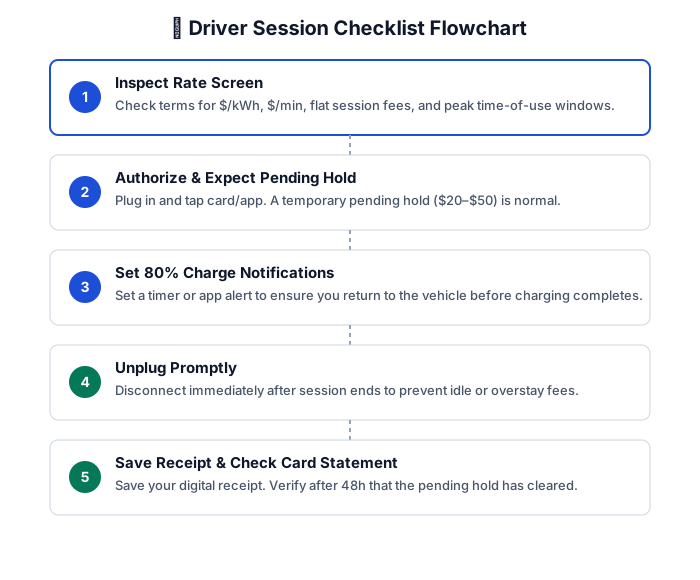
A before-you-plug-in checklist and what to save after the session
Use this short checklist at the charger:
- Inspect the Rate Screen: Verify energy ($/kWh), connected-time ($/min), and flat session fees.
- Check for Idle Triggers: Note the exact grace period and per-minute penalty after charging stops.
- Confirm Network/App Connection: Ensure your active account or pass is registered to get member pricing.
- Take a Quick Photo/Screenshot: Capture the station ID and posted rate structure before initiating session.
After the session, save the receipt or session summary. Useful records include the station location or identifier, start and end times, energy delivered, displayed rate terms, final total, payment method and any applicable tax or fee lines. A screenshot of a price screen can be particularly helpful if you later need to ask a question about how a charge was calculated.
This is a recordkeeping practice, not a guarantee that every network displays the same details or that a screenshot resolves a billing issue. Still, it makes a support conversation more specific and efficient.
When to contact the network or card issuer about a charge
Start with the charging network when the question is about the session itself: the station price, delivered energy, time connected, a fee trigger, receipt details, or a charge that does not appear to match the session record. Provide the date, approximate time, station location or ID, account email if applicable, and screenshots or receipt information.
Contact your card issuer when the concern is primarily card-account related, such as an authorization hold that remains pending longer than the issuer expects, an unfamiliar transaction, a declined payment, or a posted charge you do not recognize. The issuer can explain the status of activity on the card account; the charging network can explain its session and billing record.
For a possible duplicate, begin by distinguishing a pending authorization from a completed charge. Then compare the final network receipt with posted transactions. If there is still a mismatch, contact the network with the documentation first where practical, and follow your card issuer’s dispute process if the issue remains unresolved.
Public charging costs are easiest to manage when you treat each stop as its own transaction. Read the station-specific terms before plugging in, avoid staying connected beyond the displayed limit, and keep the final session record. Those few steps can turn an unexpected-looking charge into something you can quickly understand and, if necessary, clearly question.
Sources