
Public DC fast charging involves two separate tasks: connecting your vehicle to the charger and starting a paid charging session. Plug & Charge is intended to make the second task easier. When it is available and correctly set up, the charger can identify an enrolled driver account and start the session after the vehicle is plugged in. For example, Electrify America describes Plug & Charge as automatically identifying an enrolled account and initiating charging after connection.
That convenience can reduce the number of steps at the charger. It should not, however, be treated as a promise that every public charging stop will start automatically. Your vehicle, your account setup, the network, and the particular charging station all need to support the process. A practical approach is to use Plug & Charge when it works while keeping a normal app- and payment-based fallback ready.
What Plug & Charge does
At a compatible charging stop, Plug & Charge can associate the connected vehicle with an account that has already been enrolled for the service. Instead of opening an app, selecting a charger, and manually beginning the session, the charging system may recognize the account and begin charging after you connect.
The benefit is primarily convenience:
- Fewer steps to begin a charging session.
- No need to manually select the charger in an app when automatic authentication works.
- Payment can be associated with the enrolled charging account.
- The vehicle and charging network can handle authentication automatically at compatible stations.
The exact enrollment process, eligible vehicles, and participating stations differ by provider and can change. Check current instructions from both your vehicle manufacturer and the charging network before depending on it for a trip.
What Plug & Charge is not
Plug & Charge is not the same as merely saving a credit card in a charging app.
A network app with a stored payment method may let you start a session quickly, and in some cases it may streamline charging activity within that provider's ecosystem. But that alone does not mean the vehicle can be automatically recognized when it is connected to every participating charger.
It also does not guarantee:
- That the charging station will be available when you arrive.
- That every charger on a network supports your vehicle's Plug & Charge setup.
- That a charger or connector will be working.
- That your vehicle is eligible for the feature on every supported network.
- That account, payment, or authentication issues cannot occur.
This distinction matters during trip planning. Think of Plug & Charge as an optional method of starting a session, not as a replacement for checking charger details or carrying a way to start charging manually.
The three pieces that need to line up
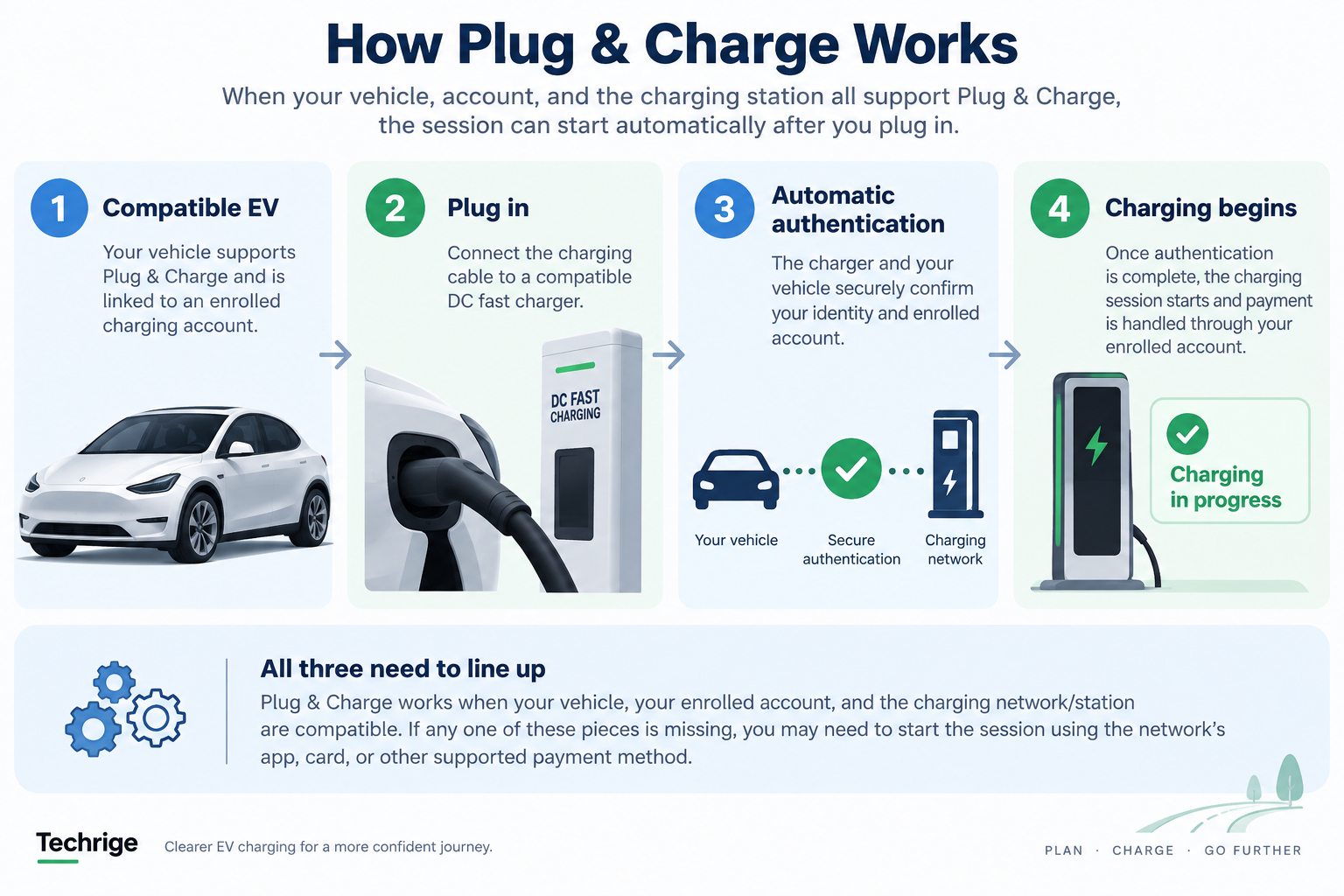
A successful automatic start generally depends on three conditions working together.
1. A supported vehicle
Your specific vehicle must be eligible for the relevant Plug & Charge program. Eligibility can depend on model, model year, software configuration, and the manufacturer’s current support arrangements. A charger may be capable of Plug & Charge without every vehicle being eligible. Electrify America explicitly notes that its chargers are Plug & Charge capable while not every vehicle is eligible.
Do not assume that support on one network proves support on another. Start with your manufacturer’s charging information, then compare it with the network you expect to use.
2. Completed account and payment enrollment
Plug & Charge generally requires more than downloading an app. You may need to create a network account, add and maintain a valid payment method, accept applicable terms, and complete any vehicle-to-account linking or activation steps specified by the vehicle maker or network.
Before a longer drive, sign in to the relevant account rather than assuming an old password, expired card, or incomplete enrollment will be resolved at the charger. If your vehicle or charging provider displays an activation status, review it before departure.
3. A compatible network and station
The planned charging network and the individual station must support the feature for your vehicle. Compatibility can vary even within an ecosystem. GM Energy says Energy Pass Plug & Charge availability varies by network, station, and vehicle.
This is why a route plan should not rely on the words “Plug & Charge available” alone. Confirm the current information for the specific network and stop you plan to use. Where possible, identify a nearby alternative charging location before leaving.
How to check Plug & Charge before a trip
A short check before departure is usually easier than troubleshooting with a low battery at an unfamiliar charger. Use this planning routine.
Review your vehicle maker’s current guidance
Look in the vehicle app, charging settings, owner resources, or manufacturer support materials. Confirm whether your model is currently supported and whether you need to enable a setting or link a charging account.
If the information is unclear, treat Plug & Charge as unconfirmed rather than assuming it will work.
Check the charging network’s instructions
Open the network’s current Plug & Charge page or app information. Look for vehicle eligibility details, setup steps, participating locations, and the expected order of actions at the charger. Make sure your account is signed in and your payment method is current.
It is also sensible to check whether a membership, pricing plan, or separate network account affects the way you intend to charge. Do not wait until arrival to discover that an account needs verification or a payment method needs updating.
Check the actual charging stop
For the stop on your route, check the network app for station status, connector information, and any notices that could affect your visit. These details can change, so a check close to departure is more useful than relying on an old route plan.
Plan an alternative station or network within your available driving range. The alternative does not need to provide Plug & Charge; it needs to offer a viable way for you to begin a normal charging session.
Test it on a low-pressure charging stop
If you have just enrolled, consider trying the feature near home or on a routine journey before a long drive. This can help you confirm that your account, vehicle, and a compatible station work together without turning the first attempt into a trip-critical decision.
Arrival checklist: confirm charging, don’t assume it
Plug & Charge can reduce the steps needed to start, but you should still verify the session. Electrify America instructs Plug & Charge users to check the charger screen to ensure charging has begun and then monitor progress in the app.
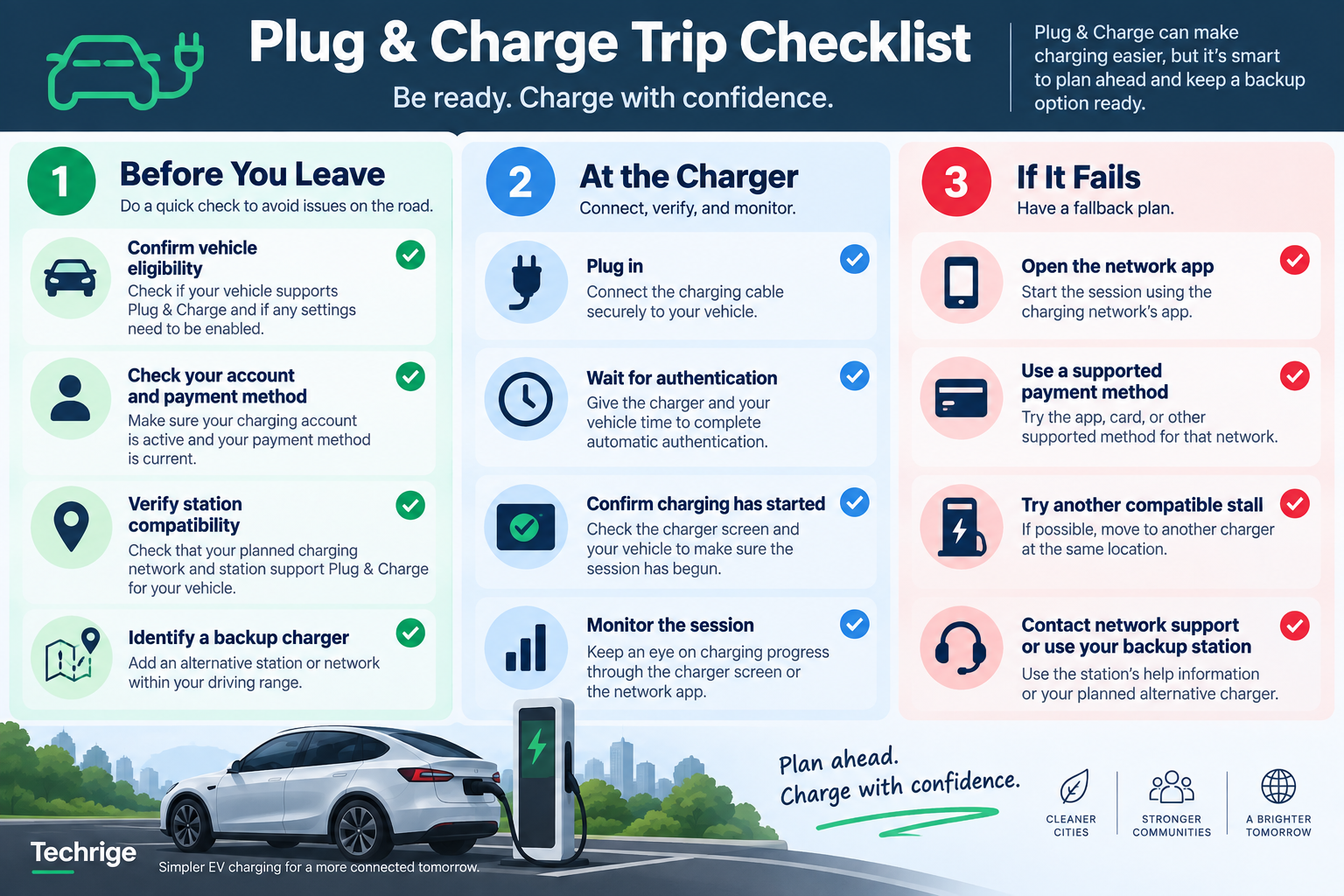
At the charger, use this checklist:
- Confirm that you are using the intended charger and compatible connector.
- Connect the charging cable securely to the vehicle.
- Give the charger and vehicle time to complete authentication.
- Check the charger screen to confirm that the session has actually started.
- Confirm that your vehicle indicates it is receiving power.
- Monitor the charging session through the vehicle or network app when available.
- If automatic authentication fails, switch to the network's normal app, card, or other supported payment process.
If the charger does not show that charging has started, do not assume it will begin later. Follow the network’s normal app or payment workflow, try another compatible stall if appropriate, or contact network support using the number or help option associated with the station.
Build a backup plan for every public fast-charging trip
The most reliable mindset is simple: Plug & Charge is a convenience, not your only path to charging. A backup plan does not need to be complicated, but it should be ready before you need it.
Keep the relevant network apps installed and signed in
Install the apps for the networks you may use and make sure you can sign in. Update them before longer trips when practical. Keep your account recovery details accessible in a secure way so that a forgotten password does not prevent you from starting a session.
Maintain a valid payment method
Review the payment method in each relevant account before travel. A saved card may expire, be replaced, or be declined. Plug & Charge depends on the associated account arrangement, while a manual app start also commonly requires account and payment access.
Know how to reach support
Keep a phone charged and have a way to contact the charging network if a session fails to start. The station display, network app, or location listing may provide support information. When you contact support, be ready to identify the station or stall and describe what the screen shows.
Carry enough flexibility in your route plan
Avoid planning around a single automatic-start assumption. Choose charging stops with practical alternatives and allow enough battery range to reach one when conditions permit. This is a route-planning decision, not a guarantee that a particular station will be available.
Use network-specific fallbacks when needed
Procedures are not interchangeable across charging networks. For example, Tesla’s current instructions for non-Tesla drivers using Superchargers describe using the Tesla app, creating a Tesla Account, adding vehicle details, and adding a payment method.
Depending on the vehicle and Supercharger type, access procedures can differ. That is a Tesla-specific example, not a universal procedure for other networks.
Before relying on any network, use that network’s own current guidance. Do not assume that an account, payment method, connector process, or direct-payment option from one provider will apply elsewhere.
Why availability can still vary
Plug & Charge is developing across a charging landscape with different vehicle makers, network systems, and station configurations. In December 2024, the Joint Office of Energy and Transportation described fragmented implementations across automakers and charging networks while announcing a common EVPKI framework intended to support broader Plug & Charge interoperability.
For drivers, the practical conclusion is not that Plug & Charge is unusable. It is that current availability should be verified for the particular combination of vehicle, account, network, station, and region involved in your trip.
Interoperability efforts may improve consistency, but it is not useful to plan today’s drive around expected future support. Use the information presently available in your vehicle-maker and charging-network tools.
A practical rule for drivers
Use Plug & Charge when your vehicle, account, and planned charging stop are confirmed as compatible. Then verify the charger screen and vehicle after connecting.
At the same time, keep your network apps, account access, payment method, and support contact route ready. This approach preserves the convenience of automatic authentication without making your charging plan dependent on a single feature working at a single stop.
Sources
- Electrify America — Plug & Charge
- GM Energy — Energy Pass
- Tesla — Supercharging Other EVs
- Joint Office of Energy and Transportation — Universal Plug & Charge