
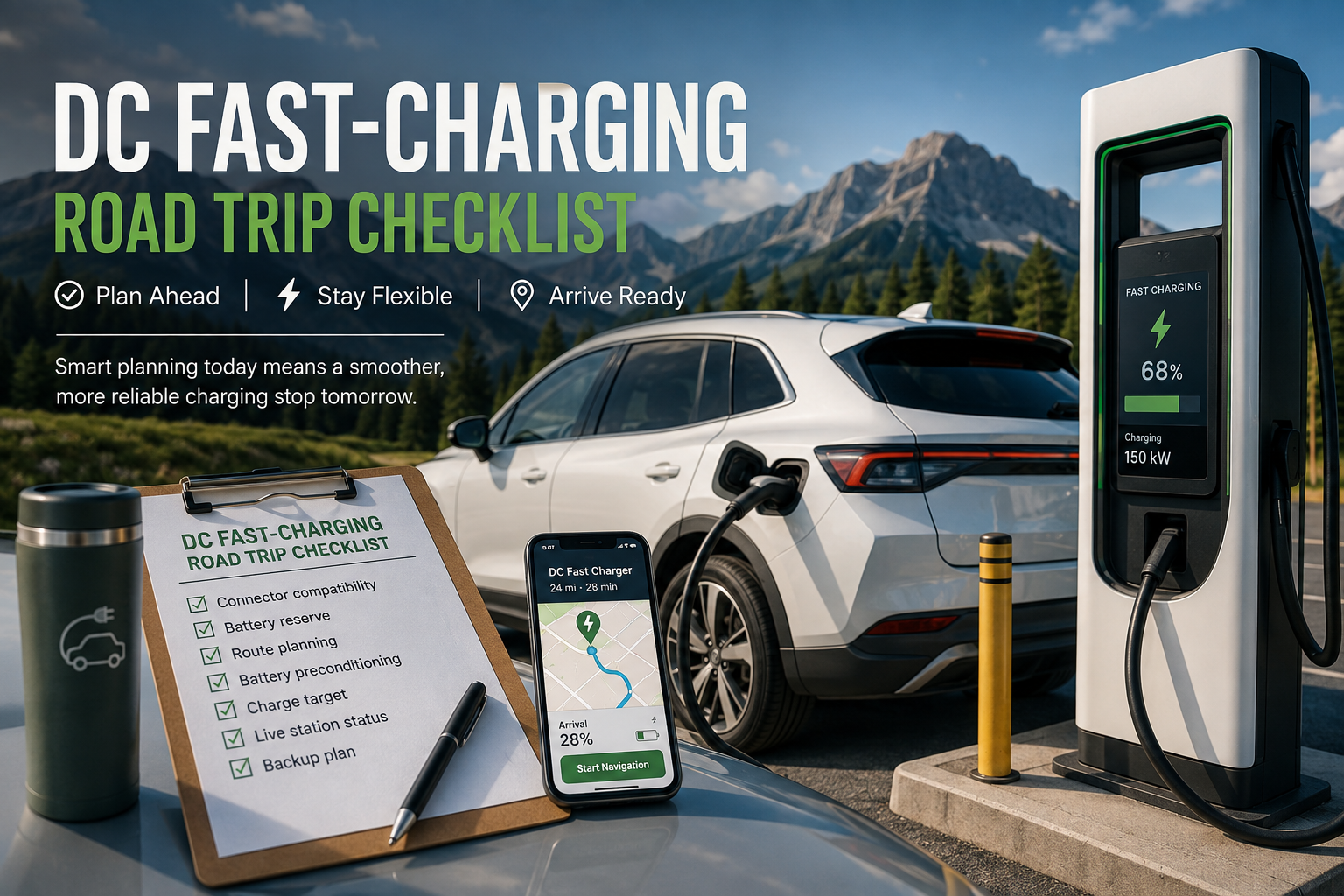
A DC fast-charging stop is much easier when the important decisions are made before you leave. Instead of simply searching for the nearest fast charger when your battery gets low, plan around compatibility, route conditions, battery state of charge, charging-network access, and at least one backup option.
This is especially useful on longer EV road trips and when temperatures are unusually hot or cold, because weather and battery temperature can affect both driving efficiency and charging performance.
The goal is not to predict every detail of a charging session. Charger availability, charging speed, payment success, connector access, adapter compatibility, and station conditions can all vary by vehicle, software version, charging network, and individual site.
The better approach is to build enough flexibility into the trip that one unexpected problem does not become an emergency.
1. Start with a clear goal for the charging stop
The goal is not simply to find a map pin labelled “fast charger.”
The goal is to arrive at a compatible and usable DC fast charger with enough remaining battery energy to make a calm decision if the charger is occupied, unavailable, slower than expected, or otherwise unsuitable.
Before choosing a stop, consider:
- Your expected battery level on arrival
- How much energy you need for the next leg
- How far away the next practical charging option is
- Whether the station has multiple compatible charging ports
- Whether you need an adapter
- Weather and temperature conditions
- Possible detours, traffic, elevation changes, or towing
- A backup charging location that remains reachable
A practical arrival buffer is a personal planning decision rather than a fixed percentage that works for every EV and every trip.
You may want a larger reserve when charging stations are widely spaced, weather is difficult, you are travelling through an unfamiliar area, or you are still learning how your EV performs under those conditions.
The important principle is simple: do not plan a route that depends on everything going perfectly.
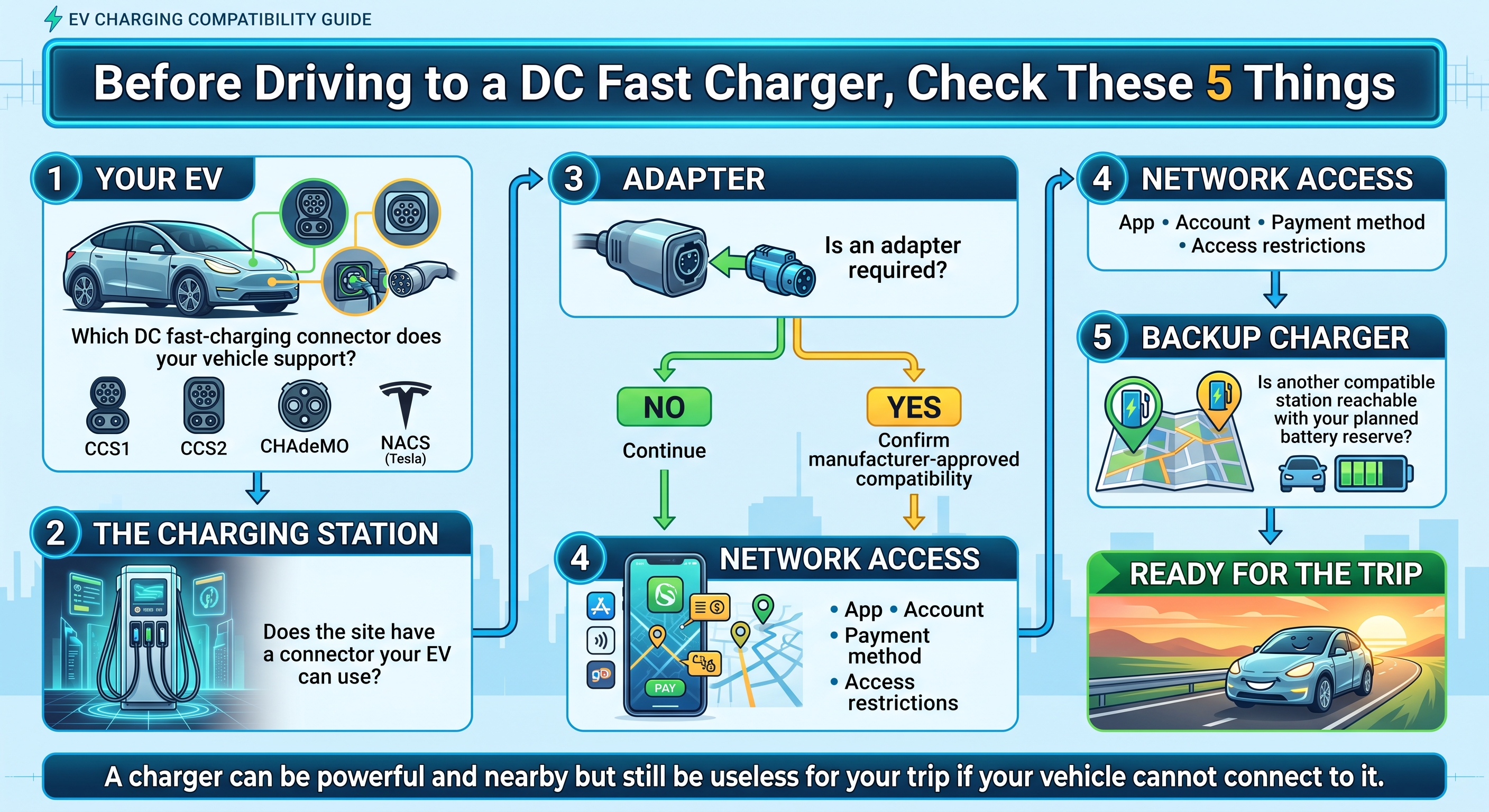
2. Confirm connector and adapter compatibility first
Do not assume that every DC fast charger can charge every EV.
In North America, common DC fast-charging connector systems include Combined Charging System (CCS), CHAdeMO, and SAE J3400/NACS. The mix is evolving as manufacturers introduce new vehicle ports and adapter support.
The U.S. Department of Energy Alternative Fuels Data Center's EV consumer guide explains the major connector types and emphasizes the importance of knowing which connectors are compatible with your vehicle.
Before travelling to a station, confirm:
- Your vehicle's DC fast-charging port
- The connector available at the station
- Whether an adapter is required
- Whether your vehicle manufacturer approves that adapter and charging combination
- Whether the specific charging network supports your vehicle
- Whether any account, app, membership, or payment setup is required
An adapter should never be treated as automatically making two charging systems compatible. Check your vehicle manufacturer's current documentation and the charging network's current instructions.
It is also useful to know your EV's maximum DC charging capability.
A station rated at 150 kW, 250 kW, 350 kW, or more does not mean your vehicle will necessarily accept that amount of power. The vehicle and charger negotiate how much power the battery can receive at that moment.
The Department of Energy's EV charging-station overview explains that actual DC fast-charging power varies with factors including the vehicle and battery state of charge.
3. Choose the charging stop with the whole route in mind
A good charging stop should support the next part of the journey, not merely solve your current battery percentage.
Think of the route as a sequence:
Current location → Primary charger → Next charging opportunity → Destination
For each leg, ask:
- What battery percentage does the vehicle predict on arrival?
- What reserve would I be comfortable arriving with?
- Is the charger compatible?
- Are there several chargers or only one?
- Is there another station nearby?
- How far is the next reliable charging opportunity?
- Does the route involve significant elevation, cold weather, heat, towing, or high-speed driving?
- Would a charger failure require a major detour?
The Alternative Fueling Station Locator can also be used to locate public charging stations in the United States and Canada.
Where your EV provides a built-in route planner, consider using it in addition to third-party mapping or charging apps. Vehicle navigation can sometimes incorporate battery state, predicted consumption, or battery-conditioning features that an external map may not control.
If you have selected a DC fast charger, enter it into the vehicle's navigation system early enough for any supported battery-preparation feature to operate.
That matters because some EVs can actively heat or cool the high-voltage battery before fast charging.
4. Treat battery preconditioning as vehicle-specific
Battery preconditioning—sometimes called battery conditioning or en-route preconditioning—can help some EVs prepare their battery for DC fast charging.
It can be particularly useful when the battery is very cold or very hot.
However, drivers should not assume that every EV includes the feature or that it works in the same way across makes, models, software versions, and model years.
Check your vehicle manual for three things:
- Does your EV support battery conditioning for DC fast charging?
- How is the feature activated?
- Does the charger need to be selected through the vehicle's built-in navigation system?
Tesla example
Tesla's current Model Y documentation explains that the vehicle can precondition its high-voltage battery when navigating to a Supercharger. Depending on the market and charging location, supported third-party fast chargers can also trigger battery preparation.
See Tesla's current Model Y Maps and Navigation documentation.
That is a description of a Tesla-specific workflow, not a universal EV feature.
Ford example
Ford says its electric vehicles equipped with the applicable Connected Navigation functionality can use En-Route Preconditioning when approaching a selected DC fast charger. The system can warm or cool the battery to help prepare it for charging.
See Ford's current Connected Navigation information.
Availability can depend on vehicle, trim, model year, connected services, and software configuration.
Hyundai example
Hyundai also documents Battery Conditioning on equipped vehicles. Its owner information explains that battery conditioning can operate when a DC charging station is selected as a destination or waypoint in the vehicle's navigation system.
See Hyundai's Battery Conditioning and EV specialised functions guidance.
The important takeaway is not that one manufacturer's method is better than another.
It is this:
If your EV supports battery conditioning, follow the navigation and charging workflow specified by its manufacturer.
If you are not sure whether conditioning is available or active, plan the charging stop without depending on it.
5. Set a charge target for the next leg
Do not automatically assume that every DC fast-charging stop needs to end at 100%.
Instead, determine how much energy you need to:
- Reach the next planned stop,
- Maintain your preferred arrival reserve, and
- Preserve enough flexibility if conditions change.
Before plugging in, ask:
- Where am I driving next?
- How far is the next leg?
- What battery percentage does the vehicle predict at arrival?
- How much reserve do I want?
- Are reliable charging alternatives available after this stop?
- Are temperatures, wind, rain, snow, traffic, elevation, or towing likely to increase energy consumption?
- Would charging somewhat longer now reduce risk later?
Many EVs reduce charging power as battery state of charge rises, particularly at higher percentages. The U.S. Department of Energy notes in its winter EV guidance that charging power commonly decreases as batteries approach the upper portion of their charge range.
That does not mean you should never charge to 100%.
There are trips where additional range is more valuable than minimizing charging time—for example, before a long stretch with limited charging options.
The better rule is:
Charge for the next leg of the trip rather than following the same percentage target at every stop.
6. Check live station details close to departure
A charging station that looked ideal when you planned the trip several days ago may not look the same when you actually travel.
Shortly before departure—or before committing to a charger—check the most current information available through the charging network, your vehicle, or another trusted charging application.
Look for:
- Connector type
- Charger power
- Number of charging ports
- Current availability, where provided
- Out-of-service chargers
- Site access restrictions
- Hours of operation
- Parking restrictions
- Pricing
- Idle or congestion fees
- App or account requirements
- Payment methods
- Adapter requirements
The Department of Energy explains that networked charging platforms can allow drivers to locate stations, view real-time station status, start charging sessions, and make payments where required. See the Alternative Fuels Data Center's charging-network guidance.
However, even live information can change.
A charger displayed as available can become occupied before you arrive, and a charger shown in an online database may encounter a fault after its most recent status update.
For that reason, station information should be considered a planning input rather than a guarantee.
7. Recheck the charger when you arrive
Before parking and beginning the session, verify that the charger in front of you matches what you expected.
Check:
- Connector type
- Charger or stall identification
- Displayed power rating
- Parking restrictions
- Charging-network instructions
- Displayed price
- Idle or congestion fees
- Adapter requirements
- Physical condition of the connector and cable
Follow the charger and vehicle manufacturer's instructions before connecting.
If a charging connector, cable, charging port, or station appears visibly damaged, do not attempt to improvise a repair or force the connection. Use another charger and report the issue to the station operator where appropriate.
A station appearing on a map does not guarantee that a session will start successfully.
The conditions at the actual charging port are what matter when you arrive.
8. Expect charging power to vary during the session
The number printed on a fast charger—such as 150 kW, 250 kW, or 350 kW—describes the charger's capability. It is not a promise that your EV will receive that amount of power throughout the session.
The Department of Energy's charging-station overview notes that charging time and power can depend on factors including:
- Battery state of charge
- Battery capacity and type
- Vehicle charging capability
- Charging-equipment power
- Electrical-service specifications
Battery temperature can also influence charging performance.
As a result, the power displayed during a charging session may rise, fall, or remain below the charger's maximum rating.
Two visits to chargers with the same advertised maximum output can therefore produce different results.
Do not immediately assume something is wrong simply because a 350 kW charger is not delivering 350 kW to your vehicle.
The relevant question is whether the session appears to be operating normally for your vehicle, battery condition, state of charge, and charging station.
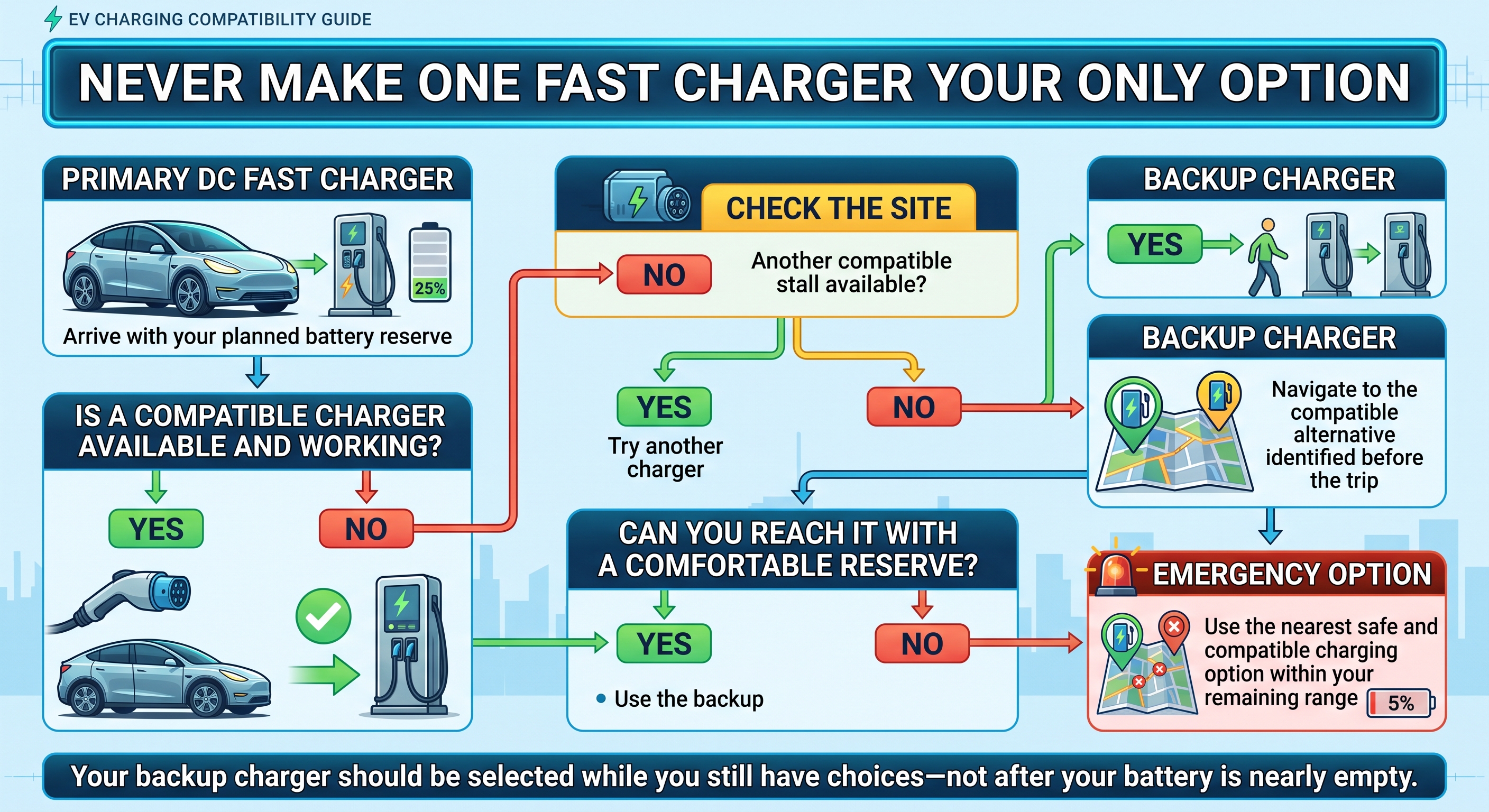
9. Keep a backup charger within reach
One of the most useful habits for EV road trips is identifying a backup charging stop before you need it.
Ideally, the backup should:
- Be compatible with your vehicle
- Be reachable with your planned battery reserve
- Be reasonably close to your intended route
- Have sufficient charging capability for your needs
- Be accessible during the time you expect to arrive
Where practical, consider more than one alternative on remote or unfamiliar routes.
Your backup plan might look like this:
Primary charger → Nearby secondary charger → More distant emergency charging option
The idea is not to assume that chargers will fail.
It is to ensure that the first charger does not become your only possible charger.
10. Adjust the plan for hot and cold weather
Extreme temperatures can make conservative planning more useful.
In cold conditions, your EV may use additional energy for cabin and battery heating, and a cold battery may initially accept less charging power.
The U.S. Department of Energy recommends warming or preconditioning an EV where supported and maintaining sufficient battery charge when travelling in cold weather. See the Department of Energy's winter EV guidance.
Hot conditions can also affect battery thermal management and charging behavior.
Rather than relying on a universal temperature rule, follow your vehicle manufacturer's guidance and consider increasing your arrival reserve when:
- Temperatures are unusually high or low
- Weather is deteriorating
- Chargers are widely spaced
- Your route includes large elevation changes
- You are carrying unusually heavy loads
- You are towing
- You are unfamiliar with the vehicle's real-world efficiency under those conditions
A little additional reserve can create considerably more flexibility if actual energy consumption differs from the original estimate.
Quick DC fast-charging road trip checklist
Before leaving—or before committing to your next charging stop—confirm:
- I know which DC connector my EV supports.
- Any required adapter is approved for my vehicle and intended charging network.
- The charger appears compatible with my EV.
- I checked the station's latest available status.
- I know how I will start and pay for the charging session.
- I entered the charger into my vehicle navigation if required for battery conditioning.
- I know approximately how much battery I expect to have when I arrive.
- My arrival reserve gives me enough flexibility if something changes.
- I know how much charge I need for the next leg.
- I identified at least one compatible backup charger.
- My backup remains reachable with my planned battery reserve.
- I considered weather, temperature, traffic, elevation, and other route conditions.
- I will recheck the connector, price, access rules, and charger condition when I arrive.
The bottom line
Reliable DC fast-charging road trips are less about finding the fastest-looking charger and more about creating options.
A strong charging plan answers four questions before battery level becomes a concern:
Can my EV use this charger?
How much battery should I have when I arrive?
How much energy do I actually need for the next leg?
What will I do if this charger is unavailable?
Once those questions are answered, DC fast charging becomes much easier to incorporate into longer journeys.
Compatibility, station status, charging performance, battery conditioning, and payment systems can still vary by vehicle and charging network, so always check your vehicle manufacturer's current documentation and the charging provider's current information before relying on a particular charging stop.
This article does not assume any particular Techrige route-planning, charger-discovery, payment, reservation, or live-availability functionality. Drivers should use the tools and information available for their specific vehicle and selected charging network.
Sources
- U.S. Department of Energy Alternative Fuels Data Center — Electric Vehicles for Consumers
- U.S. Department of Energy Alternative Fuels Data Center — Electric Vehicle Charging Stations
- U.S. Department of Energy Alternative Fueling Station Locator
- U.S. Department of Energy Alternative Fuels Data Center — Electric Vehicle Charging Networks
- U.S. Department of Energy — Winterizing Your Electric Vehicle
- Tesla Model Y Owner's Manual — Maps and Navigation
- Ford — Connected Navigation and EV Battery Preconditioning
- Hyundai Owner's Manual — Battery Conditioning and EV Specialized Functions